


Roboflow Integration
The Roboflow Integration allows your app to use Roboflow to run and deploy computer vision models without complex infrastructure. Once connected, you can use Roboflow to power image detection, object tracking, classification, and segmentation workflows.
What You Can Do
With Roboflow, your app can:
- Run pre-trained computer vision models for detection, classification, or segmentation.
- Deploy and use custom-trained models built in Roboflow.
- Automate workflows that rely on visual inputs — e.g., quality checks, object detection, image analysis.
- Process images sent from your app on demand.
- Combine vision outputs with other integrations (e.g., AI reasoning, automation flows).
Step 1: Obtain a Roboflow API Key
- Go to your Roboflow API settings.
- Under API Keys, copy your Private API Key. The Workspace ID on the same page is your
WORKSPACE_NAME.
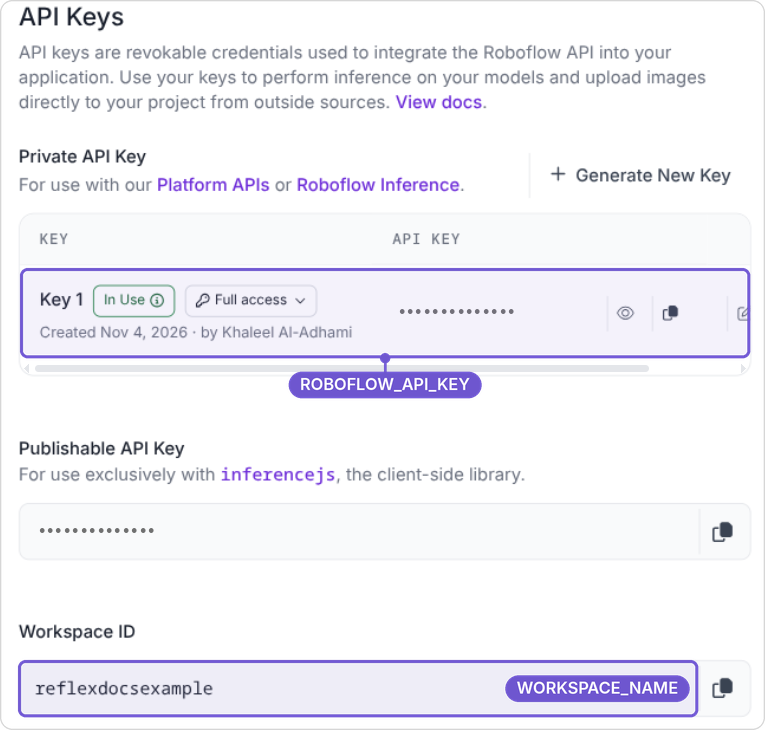
💡 Don't use the Publishable Key (rf_...). It can only run inference from browser code and won't work here.
Step 2: Set up your Model in Roboflow
- Go to Workflows and click Create a Workflow.
- Set up the workflow you want to use in your app, ensuring that it takes an image as input.
- Save and publish the workflow, then click Use at the top of the workflow editor and choose the hosted API option.
- Copy the
workspace_nameandworkflow_idfrom the provided code snippet.

Step 3: Configure the Integration in Your App
- In Reflex Build, open the Integrations tab and select the Roboflow card.
- Click Add connection and fill in ROBOFLOW_API_KEY, WORKSPACE_NAME, and WORKFLOW_ID.
- Click Connect to save the connection.
Once connected, your app can call Roboflow models directly from workflows, UI actions, or automated triggers.
Step 4: Notes
- Keep your key secure: Never expose your Roboflow key in client-side code.
- Use environment-specific keys: Separate dev, staging, and production keys to control access.
- Model flexibility: Use community models or your own custom-trained models.
- Image-based vision: Ideal for applications involving photo uploads, inspection, or visual AI on still images.