


HubSpot Integration
The HubSpot Integration allows your app to use HubSpot as a CRM and marketing automation platform. Once connected, your app can sync leads, manage contacts, update pipelines, and trigger workflows directly from user actions or automated events.
Step 1: Obtain a HubSpot Access Token
- Log in to your HubSpot account.
- Go to Development → Keys → Service Keys (also linked from Settings → Integrations → Service Keys).
- Click Create service key and give it a name. Click Add new scope, check the scopes your app needs (e.g.,
crm.objects.contacts.read,crm.objects.contacts.write), click Update, then Create and confirm. 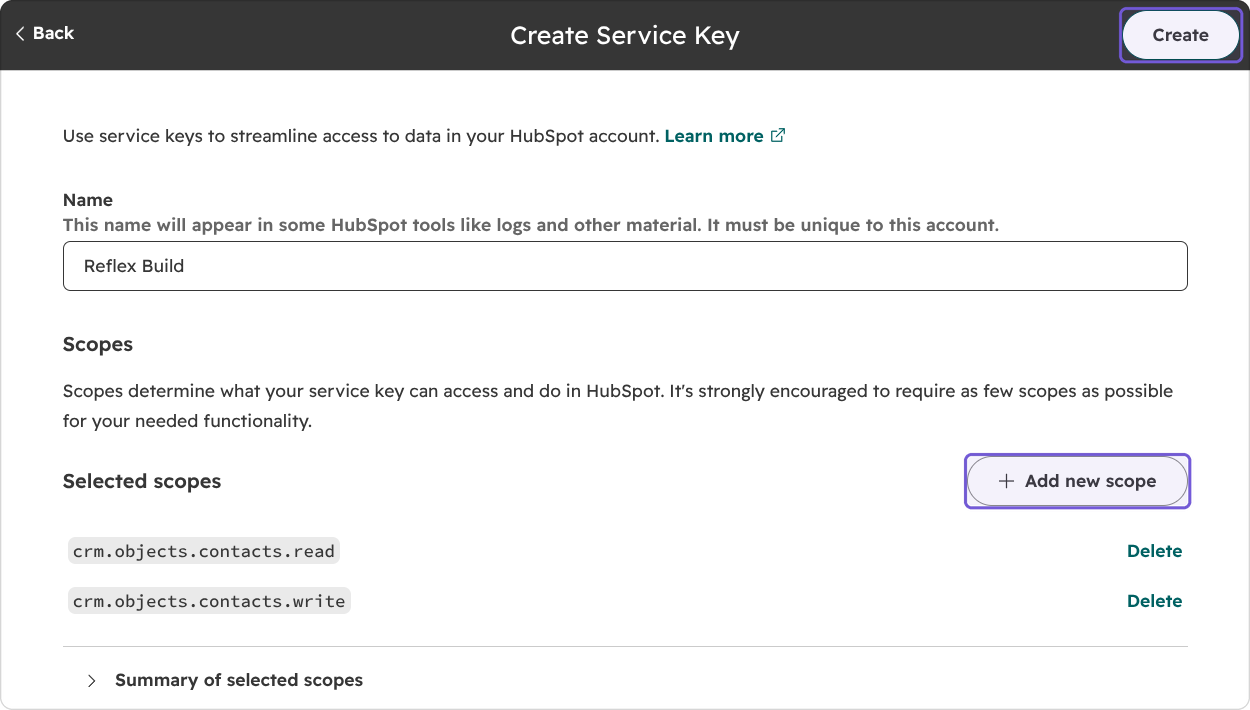
- Open the new key and click Copy (or Show to see it).
- Example:
pat-na1-xxxxxxxx-xxxx-xxxx-xxxx-xxxxxxxxxxxx
💡 HubSpot no longer allows creating new legacy private apps, but you can still use the access token of an existing one.
Step 2: Configure the Integration in Your App
- In Reflex Build, open the Integrations tab and select the HubSpot card.
- Click Add connection and paste your access token into HUBSPOT_ACCESS_TOKEN.
- Click Connect to save the connection.
Once connected, your app can sync and manage HubSpot data directly from workflows and UI actions.
Step 3: Notes
- Keep your token secure: Do not hardcode your HubSpot token in public code repositories.
- Use environment-specific tokens: Separate dev, staging, and production tokens to manage access.
- Secure API access: The token allows your app to interact with HubSpot endpoints securely and efficiently.