
Building software has never been faster, but speed has always come with trade-offs. Low-code platforms accelerated application development by replacing much of the underlying code with visual interfaces, reusable components, and prebuilt services, allowing teams to deliver business applications in a fraction of the time.
Low-code is a software development approach that uses visual tools and prebuilt components to build applications with minimal manual coding. That speed comes from abstraction, and those abstractions introduce the trade-offs around customization, portability, governance, and long-term ownership.
AI is changing how teams evaluate those trade-offs. To understand that shift, let's look at the abstractions behind low-code and the engineering trade-offs they introduce.
What is Low-Code?
Low-code simplifies application development through visual development tools. Teams use drag-and-drop interfaces, prebuilt components, and model-driven design to create applications with less code**.**
Forrester popularized the term low-code in 2014, tracing its roots to Rapid Application Development (RAD) tools from the 1990s and early 2000s. Low-code platforms achieve that speed through layers of abstraction. Unlike no-code platforms, they typically allow developers to extend applications with code while reducing the amount of code required. Those abstractions also shape how much visibility, flexibility, and control developers retain over the systems they build.
Every layer that accelerates development also moves you further away from the underlying implementation, and understanding that distance is the key to using low-code without creating unnecessary constraints. The strengths and limitations of low-code become clearer when it is viewed alongside no-code and code-first development.
Low-Code vs. No-Code vs. Pro-Code: The spectrum
Modern application development exists on a spectrum, defined by two questions:
Who builds the app, and how much control you keep as the app becomes more complex.
At one end, no-code platforms prioritize accessibility and rapid delivery. At the other, code-first development offers complete control over the application stack. Low-code sits between these extremes, combining visual development with the ability to extend applications using code when greater flexibility is required.
No-code
No-code platforms let business users and citizen developers build applications through visual interfaces, with little or no programming required.
No-code platforms work best for simple business applications, internal tools, and workflow automation, where applications can be assembled using the platform's built-in capabilities. As application requirements evolve, teams may need more flexibility and control to support increasingly complex use cases. If you're already outgrowing no-code, learn how to migrate from no-code to Reflex.
Low-code
A low-code approach allows users to build software applications with minimal hand coding. Low-code platforms combine visual development with the ability to write code when needed. They support collaboration between professional developers, technical teams, and business users, enabling organizations to build more sophisticated applications while retaining the option to extend functionality with code.
Organizations commonly use low-code platforms to build enterprise applications, customer portals, internal tools, workflow automation, and other business systems that need more flexibility than no-code platforms can offer, including custom mobile and web apps. While developers can drop into code when needed, applications are still built within the platform's programming model, abstractions, and runtime.
For a deeper look at how low-code tools differ in practice, see our comparison of Reflex, Retool, and Superblocks.
Pro-code and code-first
A pro-code and code-first approach means teams build software directly in a programming language and framework. Designed for software engineers, it provides full ownership of the application stack. Teams can define the architecture, customize every layer, and integrate with virtually any system or service.
It is best suited for complex enterprise systems, customer-facing products, and applications with unique business logic, performance requirements, or infrastructure needs. While code-first development has traditionally required more time and engineering effort than visual development approaches, AI-assisted development is narrowing that gap while preserving control and portability.
| Approach | Who builds | Customization ceiling | Where the code lives | Who owns it | Best-fit use case |
|---|---|---|---|---|---|
| No-code | Citizen developers, business users | Low | Platform-managed visual workflows and configurations | Primarily the platform | Internal tools, simple business applications, forms, and workflow automation |
| Low-code | Developers, IT teams, and technical business users | Medium to High | Platform abstractions with optional custom code extensions | Shared between the platform and your team | Enterprise applications, customer portals, internal tools, and business process automation |
| Pro-code/code-first | Software engineers | High | Your application's codebase, built with frameworks and libraries | Your engineering team | Customer-facing products, complex enterprise systems, APIs, and applications requiring full architectural control |
Low-code sits at the center of this spectrum, while code-first represents the control-heavy end. That distinction is what makes the trade-offs easier to evaluate.
What Low-Code is Good At
Low-code platforms are often used for internal tools, workflow automation, dashboards, forms, portals, and departmental applications. For these types of projects, visual abstractions help teams ship faster, reduce engineering effort, and respond more quickly to changing business needs.
Benefits of low-code platforms
The benefits of low-code become most apparent when teams use it for the kinds of problems these platforms were designed to solve. In those scenarios, abstraction reduces repetitive engineering work and accelerates delivery without requiring every application to be built from scratch. Key benefits include:
- Faster delivery: Low-code platforms reduce the amount of hand-written code required, allowing teams to ship an internal approval app in weeks instead of months.
- Broader participation: Developers can work alongside IT teams and citizen developers, allowing business users to help create apps without needing deep programming expertise.
- Lower upfront development costs: Visual development, reusable components, prebuilt integrations, and built-in security protocols reduce the engineering effort required to deliver an initial release while minimizing vulnerabilities introduced by manual coding.
- Faster iteration: Changes to workflows, user interfaces, and business rules can often be implemented and deployed more quickly, making it easier to respond to evolving business requirements.
These strengths explain why low-code is now common in enterprise software development. They also explain why its engineering trade-offs deserve equal attention.
For organizations evaluating where low-code fits over the long term, this migration guide shows how teams move from low-code to code-first development. Those benefits are easiest to see in a few common application types, which we’ll explore next.
Common use cases of low-code platforms
Low-code platforms support a wide range of business applications, and a typical low-code app often falls into one of several common use cases:
- Internal tools: Organizations use low-code platforms to build admin panels, inventory systems, employee portals, and operational applications that help teams work more efficiently.
- Departmental applications: Creating tailored solutions for Finance, HR, Operations, Customer Success, and other business units without requiring every request to go through a full software development cycle.
- Workflow automation: Automating approval processes, notifications, task management, and integrations across existing business systems.
- Dashboards and reporting: Developing dashboards that consolidate data from multiple sources to monitor business performance, operational metrics, and key performance indicators (KPIs).
- Forms and portals: Building customer portals, employee self-service portals, registration forms, and mobile and web apps that connect to existing databases and services.
- Modernizing legacy frontends: Replacing outdated user interfaces while retaining existing back-end systems, APIs, and business logic. That lets teams modernize legacy systems without a full rebuild.
- Rapid prototyping: Quickly validating ideas, testing user experiences, and gathering stakeholder feedback before committing to a full-scale implementation.
- Reducing IT backlog: Enabling business users to build approved applications for routine business needs, allowing engineering teams to focus on more complex software initiatives.
The Tradeoff Nobody Wants to Explain
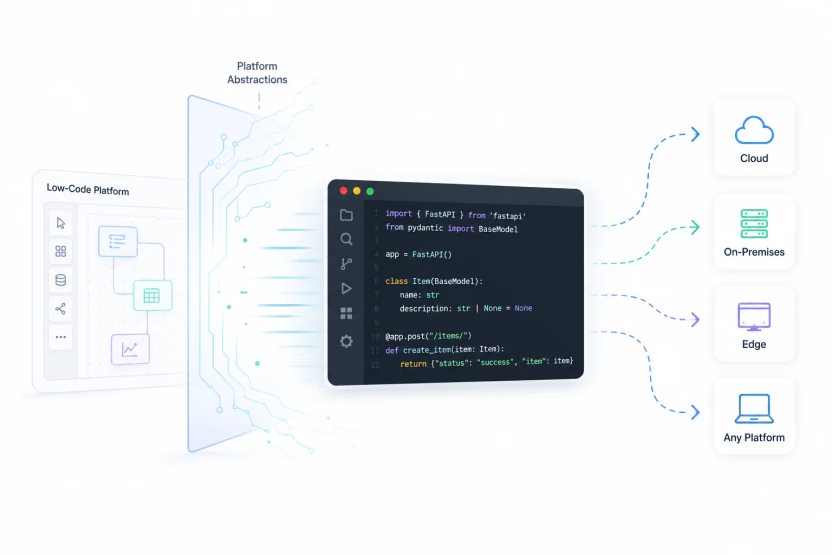
Most low-code evaluations start by comparing features and development speed. Over time, engineering teams tend to focus on a different set of questions: How portable is the application? How easily can it be customized? How does it fit into existing development workflows? What happens as adoption grows?
These are the considerations that shape the sustainability of a low-code platform. In practice, these trade-offs tend to surface in the following areas:
Vendor lock-in
Vendor lock-in is one of the most common concerns with low-code platforms because moving applications to another platform can require significant rebuilding. These platforms rely on proprietary abstractions, with components, workflows, integrations, deployment pipelines, and application metadata tightly coupled to the platform's runtime and programming model. Platforms such as Mendix, Microsoft Power Apps, and OutSystems illustrate this limitation because their proprietary platform models hinder interoperability and contribute to vendor lock-in.
While data and business logic are usually reusable, application components often need to be rebuilt because they rely on platform-specific abstractions. For organizations making long-term platform decisions, portability should be considered alongside development speed.
The customization ceiling
Low-code platforms work best until application requirements extend beyond the abstraction layer. Common business workflows, dashboards, forms, and internal applications are quick to build because the platform already includes the necessary building blocks, and many low-code platforms cover standard enterprise needs until requirements move beyond the platform's built-in abstractions.
Challenges arise when applications require highly specialized workflows, such as bespoke approval processes, unique user experiences, or complex business logic that falls outside those predefined capabilities. Although most low-code platforms allow developers to extend applications with code, there comes a point where developers spend more effort working around the platform than building with it, and some teams eventually outgrow low-code software when they need deeper control over custom behavior, deployment, and lifecycle decisions.
Governance risks and shadow IT
Low-code abstractions let business teams, domain experts, and non-technical users build software. That expands capacity, but it also raises governance requirements.
Broader participation increases the need for governance, including role-based access, approval workflows, ownership tracking, lifecycle management, and a clear review path for new apps before they go live. Microsoft's Power Platform adoption guidance recommends establishing governance and digital guardrails so professional and citizen developers can build solutions that remain managed, secure, and compliant.
Without consistent governance, organizations can lose visibility into what is being built, where data is stored, who has access to it, and how applications are maintained. When teams create applications outside established governance processes, they can contribute to shadow IT by introducing systems with unclear ownership and inconsistent controls. Without clear governance policies and ownership models, organizations risk security, compliance, and operational issues.
Scale and mission-critical systems in low-code
Low-code platforms are widely used across enterprises, including for important business applications. For highly customized and mission-critical systems, platform selection depends on architectural flexibility, operational resilience, integration capabilities, observability, and control over the application.
Enterprise platforms are expected to support applications throughout their lifecycle while adapting to changing business requirements, growing workloads, and evolving architectures. Unlike internal tools or departmental applications, these systems often become central to business operations, where downtime, performance bottlenecks, architectural constraints, or maintenance challenges can have operational and financial consequences.
Engineering teams evaluate support for complex architectures, specialized business logic, operational resilience, observability, and long-term maintainability. They also consider how easily applications can evolve as requirements change without significant workarounds or major redesigns, making long-term flexibility and reliability as important as development speed.
Version control and testing
Modern software engineering practices rely on Git, pull requests, automated testing, and continuous integration pipelines. Teams also use a broader set of tools across the development process. These workflows are built around source code in established development environments, which can be reviewed, versioned, and tested throughout the development lifecycle.
Because low-code platforms represent much of an application through visual models and platform-managed metadata, these workflows do not always integrate as naturally as they do in code-first environments, and those visual models do not always map cleanly to established tooling. For organizations with established engineering workflows, compatibility with existing source control, testing, and deployment processes can be just as important as the platform’s development experience.
Cost at scale
Low-code platforms can cut initial build time, but licensing costs often rise as adoption expands across teams and use cases.
Platform costs often shift from a project-level expense to an ongoing operational cost once organizations build more applications and onboard more users. Licensing that seems modest during an initial deployment can become more pronounced as platform usage expands across departments and business functions.
Many platforms charge by users, applications, environments, or platform usage. For organizations building many applications or serving large numbers of users, those costs should be weighed alongside scalability, development speed, operational requirements, and long-term platform strategy.
What AI Changed: The Rise of Code-First
For years, low-code platforms helped teams deliver applications faster by abstracting much of the implementation work traditionally done in code. Visual interfaces, reusable components, and prebuilt services made application development more accessible to developers and business users alike, while AI-assisted features automated repetitive development tasks.
That equation is changing. Instead of dragging components onto a canvas, developers can describe what they want in natural language and generate production-ready code. Tools such as GitHub Copilot, Claude Code, Cursor, and AI application builders are shifting more of the development workflow toward generated code. That workflow still lives within standard programming languages and frameworks, and, in many cases, it can also shorten iteration cycles.
For years, low-code's core trade-off was straightforward: teams gained speed by building inside platform abstractions, but those same abstractions introduced constraints around ownership, portability, and engineering workflows. As AI generates editable code directly within standard frameworks, much of that speed no longer depends on proprietary abstractions.
This shift has given rise to code-first development, where AI delivers much of the speed traditionally associated with low-code while developers retain ownership of the codebase. Developers can inspect, edit, version, test, and deploy the resulting code using existing engineering workflows. Instead of relying on visual abstractions to accelerate development, AI is making code the fastest path from idea to application.
How to Choose: When Low-Code Fits, and When Code-First Serves You Better
Most of the trade-offs discussed here stem from abstraction, as well as from the platform's ownership, runtime, and governance model. The right choice depends on how much flexibility, control, and long-term ownership your application requires.
Low-code is a strong fit when your application aligns with the platform's capabilities and rapid delivery is the primary goal. Consider low-code if:
- You're building internal tools, departmental applications, dashboards, customer portals, or workflow automation.
- The application's requirements fit within the platform's abstractions without extensive customization.
- Business users and developers need to collaborate on application development.
- You're comfortable operating within the platform's ecosystem and deployment model.
When code-first serves you better
Code-first development becomes the stronger choice as flexibility, ownership, and long-term maintainability become priorities. Consider a code-first approach if:
- You need complete ownership and control. Your organization requires self-hosting, data residency, portability, or complete control of the codebase.
- You need deep customization. Your application relies on complex business logic, specialized integrations, or architectural patterns beyond the platform's abstractions.
- You rely on established engineering workflows. Your team uses Git, pull requests, automated testing, CI/CD pipelines, and standard development practices.
- You're building for long-term scale. The application is customer-facing, mission-critical, or expected to support demanding performance and scalability requirements.
- You want AI-assisted development without giving up code ownership. Developers can inspect, edit, test, and own the resulting code.
Low-code decision checklist
Before choosing a development approach, consider the questions below:
- Do I need full ownership of the application's codebase?
- How easily can I move the application without rebuilding it?
- Will my application outgrow the platform's abstractions?
- Do my hosting, security, compliance, or data residency requirements require greater control?
- Who will maintain this application in two or three years, and will they be able to extend it without platform constraints?
Next Steps
The conversation around application development is no longer just about how quickly teams can build software. AI is changing how software is developed, and organizations are rethinking the balance between speed, code ownership, long-term flexibility, and vendor lock-in.
There is no universal right answer. The best approach depends on the level of control, portability, and flexibility your applications need over time. If those priorities lead you toward code-first development, explore our guide to the top enterprise AI app builders to see how these ideas apply in enterprise environments.
If your requirements point toward owning real Python code, deep customization, self-hosted deployment, and modern engineering workflows, Reflex is built for that end of the spectrum. See what code-first development looks like in practice and start building for free.