
AI app development is a rapidly growing approach to building mobile and web apps. A few years ago, organizations choosing an application platform mostly compared no-code, low-code, and traditional development. Today, there's another option: AI app builders.
An enterprise AI app builder is an AI-powered platform that helps individuals and teams build production-grade apps such as customer assistants, chatbots, and internal tools. Now we know AI can generate an app, but the question is whether the result can satisfy the security, governance, deployment, and maintenance requirements of an enterprise.
What Is an Enterprise AI App Builder?
An enterprise AI app builder is an AI-powered application development platform designed for organizations that need to turn natural-language descriptions into full-stack apps (frontend and backend) that meet security, governance, ownership, and scalability requirements. A user can prompt the AI app builder with plain-language descriptions of the application. The system then generates an app that fits the chosen programming language or framework and the project's requirements.
AI app builders fall into two broad categories: consumer/SMB AI app builders and enterprise app builders. The former is optimized for the rapid delivery of business prototypes, MVPs, analytics dashboards, and admin panels. The latter is the best fit for building enterprise-grade custom apps with business logic and compliance with requirements for scalability, security, access control, etc.
An Enterprise AI app builder goes beyond UI generation, combining UI with business logic, data bindings, and deployment to build custom apps. With the advent of AI app builders, non-technical users with no coding experience can now launch their own apps.
Why "Enterprise" Changes Everything
Consumer-grade AI app builders optimize for speed to a working demo. Enterprise AI app builders optimize for software that can survive production, security review, and long-term maintenance. Technical decision-makers in large organizations don't have to worry about new updates breaking existing systems, software ownership, or security vulnerabilities when using enterprise AI app builders.
The limitations of consumer app builders raise the need to use an enterprise-level app builder. Enterprise AI app builders aim to address many of the operational requirements that become important after an application moves beyond the prototype stage. They help build secure, compliant apps faster than with traditional development.
With enterprise AI app builders, it is not just about building apps fast but about creating apps that organizations can trust, secure, scale, and maintain over time. Enterprise AI app builders are preferred for some of the following reasons:
- Regulated organizations need on-premises or VPC deployment options to meet compliance and data residency requirements.
- Governance controls such as SSO, RBAC, and audit logs.
- Maintenance paths that let teams update code without depending on the vendor for every change.
Enterprise decision-makers have a checklist of requirements, and it is vital that an enterprise AI app builder meet most of them before it is considered for use.
The Three Types: No-Code, Low-Code, and Code-First AI App Builders
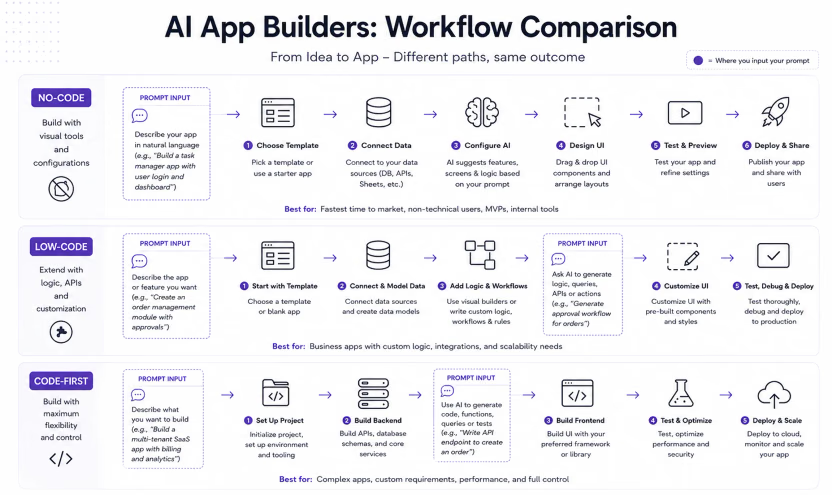
There are three common types of AI app builders: no-code, low-code, and code-first. The difference matters because each one trades off speed, control, and ownership differently.
Here's how the three approaches differ:
No-code
A no-code AI app builder allows users to build apps from a visual editor using drag-and-drop components. The process of assembling an application is entirely visual and does not require writing code. Business owners can save time by using no-code platforms to build internal tools.
Although it requires no developer experience, users are limited to only the customization options provided by the vendor. There is no full control over aspects of their application, such as data security and deployment. There is a high risk of vendor lock-in because the app typically runs within the vendor's hosted environment and cannot be fully exported.
Low-code
Low-code AI app builders sit between no-code and code-first. They give you more flexibility than no-code, but you still have the vendor's design patterns and platform limits.
Third-party integrations can be set up in minutes. There is a real risk of overreliance on the platform, especially when you depend on vendor updates to fix certain bugs.
Code-first
Code-first AI app builders generate editable code in a real framework from plain-language prompts. This gives the engineering teams more control over architecture and deployment, but also means they take on more of the implementation and maintenance work.
They offer much more flexibility and advanced customization than the other two options. The app builder creates your application with AI-generated code, but you have control over the architecture, security, API integrations, infrastructure, and more.
You can use a version control system to track code changes, ensure long-term scalability, and maintain full ownership of the code. A code-first platform is best suited to more technical people with coding experience. It is expected that development time would be longer than in no-code and low-code approaches.
There can be many pieces of infrastructure to manage. In many cases, you can switch to another platform with full ownership of your code.
Organizations incur higher costs for infrastructure, developer salaries, and longer development time. The maintenance burden rests on them to fix bugs, manage dependencies, and monitor infrastructure.
Comparing AI app builders: No-code, Low-code, Code-first
A summary of the strengths, limitations, and ownership status of no-code, low-code, and code-first platforms.
| Type | Who it's for | Strengths | Ceiling | Ownership |
|---|---|---|---|---|
| No-code | Founders, non-technical users, marketers | Visual and intuitive, fastest to launch, low maintenance | Low - Often limited by platform design and available features; a few use cases | The platform owns the infrastructure ; You are dependent on the platform |
| Low-code | Technical teams, developers, and small startups | Support for custom logic, good for building internal tools | Medium - Platform constraint; Custom logic is limited | The platform owns the infrastructure and runtime environment; You own the custom code |
| Code-first | Software developers, AI engineers, enterprises | High flexibility, advanced features, no platform lock-in, highly scalable | High - Only as powerful as AI model used by the platform, limited by your engineering skills and resources | Full control of source code, infrastructure, architecture, and deployment options. |
How To Evaluate AI App Builders: The Enterprise Checklist
AI app builders can reduce application development time, but enterprise buyers usually care more about what happens after the first demo. Security review, data residency, and ownership determine whether the app can actually survive production, so this checklist focuses on those constraints.
Use the enterprise checklist below to evaluate security, scalability, governance, ecosystem, and portability.
Security and governance
Enterprise apps often process sensitive data, especially in heavily regulated industries such as finance, healthcare, and government. Buyers should verify both security controls and governance features, such as audit logs, granular permissions, and approval workflows. AI app builders should also support relevant certifications, such as ISO 27001**,** SOC 2 Type II, and HIPAA compliance, where applicable.
The platform should implement granular access control and identity management, such as RBAC and SSO/SAML. Data encryption must be enforced both at rest and in transit.
Deployment and data residency
Data residency is a big subject; many platforms offer options for self-hosting and cloud deployment, including hybrid/VPCs, while other vendors fully host the entire infrastructure. For certain organizations, having options for on-premise or cloud deployment makes it easy to choose an enterprise AI app builder. Before organizations pick out a platform to use, some of the questions asked include: "Can data remain within our cloud account?", "Can we deploy in our own VPC?", "Does the platform support air-gapped environments?", etc.
Ownership and lock-in
Some of the easiest platforms to use can become the hardest to leave because they were designed to keep users locked in. Enterprises want full control over their data, source code, and business logic. They also want clarity on who controls the underlying infrastructure. It is also important that organizations can easily export their workflows, logs, and other data when migrating to another platform or vendor.
Extensibility and fit with engineering workflow
Besides enabling portability and migration to other platforms, an enterprise AI app builder should support the extensibility of its core features. Organizations should be able to fit their existing technology stack seamlessly. Check whether the platform supports third-party integrations with tools such as Salesforce, Jira, and Slack, since those integrations affect team collaboration and workflow fit.
Can you plug in your other service providers, APIs, webhooks, and databases? Some of these questions must be answered to determine whether a platform aligns with the organization's objectives.
Scale and real data
Enterprise apps have to hold up as usage grows. Stability and reliability matter more as the load increases. How does the app perform when usage grows from 500 to 5,000 real users?
Other questions to consider include: How quickly does the system recover from a downtime? What is the backup frequency?
Maintainability
Software changes over time, so maintainability matters. In practice, that implies that software engineers can read, understand, and modify AI-generative code a few months or years later.
The big question arises: Can the engineering team maintain what AI has built? For an enterprise app builder, it is important that the generated code is extensible and aligns with the engineering team's technology stack.
What Enterprises Actually Build with AI App Builders
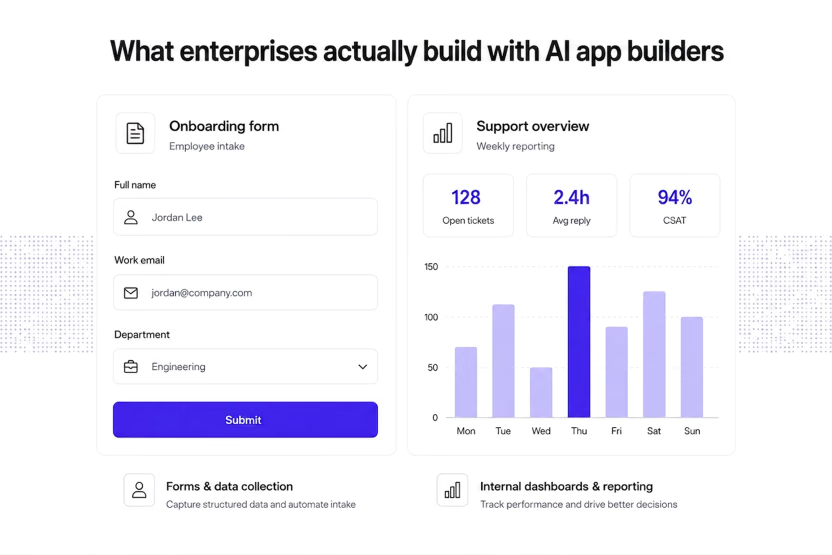
What do enterprises build with AI app builders? Mostly internal tools that support operations, reduce backlog pressure, and solve problems that do not justify a full custom build.
AI app builders are used by enterprises to build apps that solve vital problems, but these apps might be delayed for months before launch because they are at the bottom of the product backlog. It is typical that many large companies have several internal tools that the engineering team cannot possibly build and deliver on time.
Enterprises use AI app builders for a few recurring cases. The most common cases are internal tools, reporting apps, workflow automation, and integration-heavy utilities.
- Short-lived**, specific tools**: Some tools in organizational internal systems are often short-lived and used only for very specific use cases. They are often single-use, disposable tools that serve a purpose and are then ditched. It makes sense for less-technical team members to use these platforms to build these types of apps without waiting on engineering.
- Feature iteration and feedback gathering: Product teams can test-run a feature, gather feedback from potential users, and make changes in quick succession. This reduces the risk of making an upfront investment in a product or feature that eventually fails, because the stakes are much lower and easier to absorb.
- Niche tooling: AI app builders help create highly specialized tooling that is important to a small team but may not be worth the investment to build through traditional software engineering. An app of this nature can be assembled using plain-language prompts and minimal custom logic.
- Third-party integration without custom APIs: Third-party tools and services can be integrated via connectors rather than custom APIs. AI app builders enable the integration of enterprise tools with external systems such as CRMs and ERPs via connector apps. An entire workflow can be orchestrated without any custom API call.
- Enhance team productivity and corporate governance: Non-technical team members become more productive as they build their own tools and move on with their work without posing any security risks. Effective governance is enforced through role-based access control, SSO/SAML, and audit trails.
- Streamline software engineering: The software engineering team is not burdened with every request to build specific internal tools, since enterprise AI app builders can handle that process effectively. Engineers can focus on improving core business logic or fixing bugs that invariably affect the company's bottom line.
Some categories of apps that enterprises build AI tools include the following:
- Forms and data collection: These serve as primary channels for gathering information. Data pipelines and other workflows can be built around these forms. They are used for employee onboarding, incident reporting, customer feedback, surveys, etc.
- Internal dashboards and reporting: Used by enterprises to visualize and monitor business data in real time.
- Data portals and CRUD apps: Provide a user-friendly UI for accessing and interacting with the database without direct access to the core database structure.
- Workflow & process automation: These apps are mainly used by enterprises to eliminate repetitive manual tasks by automating task delegation, review, and approvals across teams, based on their business rules.
- Employee tools: Streamline HR processes and administration, including time tracking, performance management, and employee development.
- Integration and connector apps: Connect apps that can't integrate natively.
These apps are vital because they solve real problems, do not need to sit at the bottom of product backlogs for months before development begins, and reduce the total cost of software engineering.
Common Pitfalls to Avoid
Choosing an enterprise AI app builder is a critical long-term technology decision, so the main pitfalls are worth understanding early. It is vital to have a good understanding of common pitfalls to avoid, which will help you avoid locking in with the wrong vendor, failing in real-world use cases, and facing security issues.
Here are common pitfalls to be avoided:
The prototype trap: The most common issue is choosing an AI app builder after an excellent demo session with the vendor's sales team. Demos are perfectly curated for the most common use cases, with clean data, and they often have a perfected user flow. However, something breaks in your app when you apply real business data, complex business logic, and there is real-time user interaction.
Lock-in: The easiest AI tools to use are often the hardest to migrate from because you can't export your code or leave the vendor's hosted environment. In most cases, the pricing model increases rapidly, and you can't move to another platform. Scalability and frequent updates become difficult without platform workarounds or hacks.
Stack mismatch: Evaluate your potential vendor's technology stack against your organization's to determine whether there is a match. Some vendors use a JavaScript/React-based stack with a Supabase backend, which may not align with your organization's stack. When you introduce a new stack to your engineering team, it might require them to learn new skills, which could slow down the development schedule.
The maintenance cliff: The next-best thing after building an application is the ability to maintain it and push updates as needed. AI-generated code can be unreadable and quite difficult to maintain without breaking what works. Research the models powering your vendor's AI app builder and their ability to generate human-readable code for easy maintainability.
Treating an AI coding assistant as an AI app builder: Many people cannot differentiate between an AI coding assistant, such as Claude Code, Cursor, and Copilot, and AI app builders like Reflex, Lovable, and Superblocks. An AI coding assistant is a tool that aids software developers in writing, debugging, and refactoring code for an application right from the IDE. Meanwhile, an AI app builder generates an entire software application from a user's plain language prompt.
Many people cannot distinguish between these two types of AI tools. This section compares the two to help you choose the right tool for the job.
| Feature | AI coding assistant | AI app builder |
|---|---|---|
| Primary output | Suggestions in existing code, functions, code files, other artifacts | Entire application (frontend, backend), mobile apps |
| Target users | Software engineers, developers, data scientists using IDEs | Non-technical users, product/marketing team, developers |
| Export and ownership | Total ownership of code, flexibility to deploy anywhere | Some platforms allow ownership of code, business logic, and workflows; Others platforms keep code and business logic locked in with the vendor |
| Skill requirement | Requires coding knowledge; Requires understanding of programming language and framework | Little or no coding experience required; prompts are written in human-readable plain language |
| Workflow | It follows traditional software development with AI assistance in IDE | AI generates a new app in response to a prompt; no code is required to get started |
How to Choose the Right One for Your Organization
Key factors to consider when shopping for the right AI app builder for your organization include target users, source ownership, deployment, and data residency. When choosing an AI app builder, consider the team members (technical/non-technical) who will use it frequently and how much custom logic will be required. Other factors you should consider are what options are available for deployment: cloud, hybrid/VPC, self-hosted, and how portable your code is in case of migration to another platform are critical points to evaluate.
We reviewed the leading platforms side by side, highlighting their pros and cons to help you pick one that best fits your organization's preferences.
If your team needs AI-assisted development without giving up code ownership or deployment flexibility, prioritize code-first AI app builders. Reflex is one example of this approach: it generates full-stack Python apps that remain in your repository and can be deployed on infrastructure you control.