
If you’ve ever needed an app while the engineering team was already stretched, a no-code app builder can look like the fastest way forward.
For a first version, it may be exactly what you need. You can turn a rough workflow into something people can use quickly, whether you’re testing an internal tool or validating an early MVP. The harder part comes later, when more users depend on the app and new requirements begin to press against the platform’s limits.
That is when the initial speed turns into a bigger question: can you still change, move, secure, and manage the app on your own terms?
In this article, you’ll learn where no-code app builders work best, where they start to constrain you, how they compare with low-code and code-first tools, and how to decide whether no-code is the right choice for your app.
What a No-Code App Builder Is
A no-code app builder is a tool that helps you build an app without writing any code yourself. Rather than building everything from the ground up, you use visual editors, templates, ready-made components, data connectors, automation tools, and publishing features to assemble your app within the platform. Most no-code app builders are designed for people who understand the business process but are not developers.
No-code app builders are not to be confused with low-code tools. Low-code tools also use visual building, but they let developers add custom code, scripts, formulas, API calls, or extra parts when needed. A no-code app builder is aimed at people who want to avoid writing code entirely, while low-code can support custom functions or backend logic when extra flexibility is required.
Examples of no-code app builders include Bubble, Glide, Adalo, and Softr. Retool and Airtable often sit closer to the low-code end because more advanced use cases can require JavaScript, formulas, scripts, APIs, or custom logic from developers.
No-Code vs. Low-Code vs. Code-First: Where the App Lives
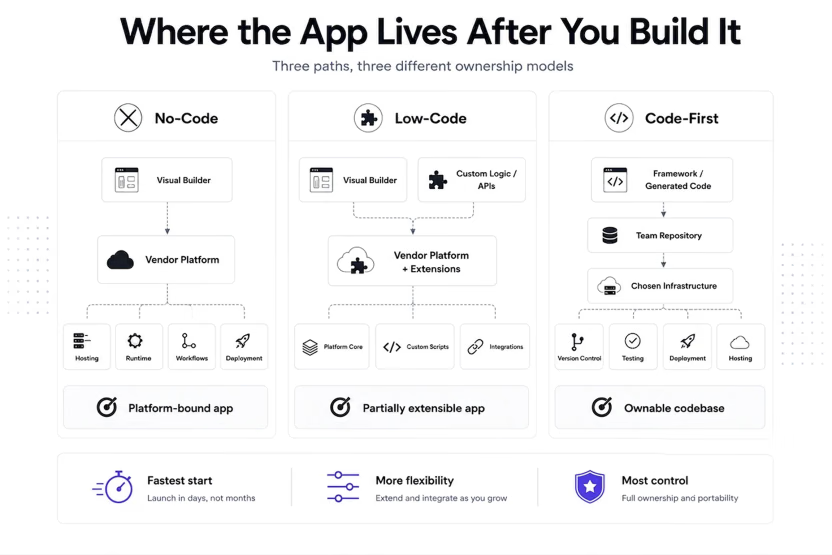
Choosing between no-code, low-code, and code-first involves more than just comparing development speed. The critical differentiator is the level of control you retain over your application post-deployment.
| Approach | Who is it built for | Where the app lives | What you gain | What you give up |
|---|---|---|---|---|
| No-code | Non-technical builders | Usually built and deployed through the vendor’s platform | Fastest start, visual builder, drag and drop tools, less engineering dependency, with users assembling a mobile app, web app, or business apps inside the platform | Limited portability, lower customization ceiling, platform lock-in |
| Low-code | Technical and semi-technical teams | Often platform-shaped, with some tools offering export code or external deployment | More flexibility, scripts, APIs, custom logic | Still shaped by the vendor’s architecture and deployment model |
| Code-first | Developers and teams writing and maintaining code | Your repository and chosen infrastructure | Ownership, portability, deeper customization, self-hosting | More technical responsibility |
No-code and low-code reduce setup by keeping more of the runtime, deployment process, and extension model inside the platform. Code-first leaves your team with a codebase it can inspect, test, deploy, and move.
What You Give Up When You Choose No-Code
Before you commit to a no-code app builder, check these risks:
- You may not get exportable code: Many no-code platforms let you export personal data, but not the application code. If you leave, the screens, workflows, permissions, integrations, and business logic often have to be rebuilt.
- Customization has a ceiling: No-code works well when your app fits the platform’s components and workflow model. Once you need custom permissions, complex approvals, unusual integrations, performance tuning, or backend behavior the tool does not support, you start building workarounds.
- Pricing can rise with usage: A no-code app can seem cheap when it has few users or workflows. As usage grows, per-user, per-app, record-based, workflow-based, or usage-based pricing can turn the app’s success into a higher recurring cost, and many platforms reserve app store publishing for paid plans.
- Security depends on the platform: If the app manages customer data, employee records, financial details, authentication, or operational information, your security review depends on what the platform allows. This includes things like access controls, logs, data residency, identity integrations, environments, audit trails, user logins, and user accounts.
- Vendor dependency becomes an operational risk: If the vendor changes pricing, removes a feature, tightens limits, shifts the roadmap, or shuts down a service your app uses, your team has to absorb the impact.
- Governance can get messy: No-code makes it easier for teams to build fully functional apps without waiting for engineering. That also means more apps can appear outside normal review processes. Over time, the company may lose track of who owns each app, what data it stores, who has access to it, and whether anyone is still maintaining it. That is how a helpful internal tool can turn into shadow IT.
These constraints may be acceptable when the app is disposable, low-risk, short-lived, or easy to replace. They deserve more scrutiny when customers, revenue, compliance, or daily operations begin to depend on it.
How to Choose Between No-Code and Code Ownership
Start with what you expect the app to become. A temporary prototype and a customer-facing product do not require the same level of ownership.
Consider no-code if:
- The app is a prototype: No-code works well when you need to test an idea or validate a workflow before committing engineering time. If the prototype becomes important, you can then decide whether it should stay in the platform or move to owned code.
- The requirements match what the platform offers: You can use the builder’s components, data model, integrations, permissions, and workflow rules without needing risky workarounds.
- Non-technical users will maintain the app: If the people using the process need to change fields, screens, steps, or automations on their own, no-code helps them do this without always needing engineers.
- The app is low-risk or easy to replace: No-code usually trades away portability, but that tradeoff may be acceptable if the app is disposable, short-lived, or easy to rebuild without affecting customers, revenue, compliance, or core operations.
Consider code-first if:
- You need full ownership of the app: It should live in a repository your team can inspect, test, change, deploy, and move as needed.
- The workflow will probably get complex: Custom permissions, unique business logic, deep integrations, performance needs, or customer-specific flows are easier to handle with code your team controls.
- The platform cannot meet your security or compliance requirements: If the app handles sensitive data, regulated workflows, audit requirements, identity controls, or data residency rules, you need greater control over how it’s built and run.
- You can’t afford to rebuild later: If the app might become part of your product, operations, customer experience, or revenue process, starting with code you own can save you from having to rebuild once people rely on it.
Here’s a simple test: if the app works out, what will you need next? If you just need a few more screens or small workflow tweaks, no-code could be the way to go. If you’ll need portability, more customization, stronger security, self-hosting, or long-term control, start with code-first. That is especially true for internal business apps that start as quick tools but later become core systems.
What AI Changes About the No-Code Decision
AI has made no-code app builders faster. Instead of starting from a blank canvas, you can describe the app you want, and the platform can produce a first draft with screens, data structures, and workflows.
But AI does not remove the ownership question. If the app still runs within the platform’s model, you may face the same limits around portability, customization, governance, security, and vendor dependency. AI may help you create the app faster, but it does not remove platform lock-in or operational constraints.
AI also changes the code-first side of the decision. Teams can now generate code using standard frameworks, then inspect, edit, test, deploy, and maintain it through normal engineering workflows. That weakens the old assumption that no-code is the only fast path to shipping.
Wrapping Up
No-code app builders are useful when the goal is to move quickly. You get speed, a visual building experience, and a way for non-technical teams to solve workflow problems without waiting for a full engineering cycle.
Once you need more control over your code, hosting, and security, the question is no longer just how fast you can build. It is whether your team can keep changing, reviewing, moving, and operating the app without being boxed in by the platform that helped you launch it.
That is where code-first becomes the safer default. You may take on more technical responsibility, but you also get a codebase your team can inspect, test, deploy, extend, and maintain on your own terms.
Reflex is one way to take that code-first path in Python. Its AI app builder helps you move from an idea to a working full-stack app quickly, while keeping the underlying application in your repository. You get the speed associated with no-code tools without giving up the ability to inspect, customize, test, deploy, and maintain the code through your normal engineering workflows.