Low-code development works well until the platform becomes the constraint. An engineering team can build an internal application, solve the immediate business need, and go live in weeks. Complex workflows, deeper integrations, stricter deployment requirements, and greater control then expose the platform’s limits.
Low-code limitations such as vendor lock-in, customization ceilings, engineering workflow friction, and rising costs are treated as separate problems. They’re not. They’re downstream of the same architectural decision. The abstractions that accelerate development also define the constraints that follow.
The real question is which applications require owned code. Low code applications depend on visual models, metadata, configuration, and platform runtime. That architecture determines what developers can control, export, customize, and integrate.
For background on these abstraction layers, see Low-Code Platforms in 2026. This article examines why those abstractions become architectural limitations and where owned code fits.
Limitation 1: Portability and Why Export Rarely Saves You
A low code development platform represents applications through visual models, metadata, generated code, or a combination of all three. For example, Microsoft Power Apps exports canvas apps as app packages, but those packages do not include connections, custom connectors, or Dataverse customizations. Those dependencies must be recreated or exported separately through Dataverse solutions.
Exporting a low code application does not produce a complete, runnable system. The export preserves application artifacts, but the platform runtime, platform services, and other platform-managed dependencies remain outside the exported application.
What actually survives an exit
Leaving a low-code platform preserves reusable application assets while requiring platform-dependent components to be rebuilt.
- Data survives: Application data is stored separately from the platform’s application model, making it available for export or migration even when the application itself remains dependent on the platform.
- Business logic: Logic independent of platform-specific services remains reusable, while logic embedded in proprietary workflows or platform services must be rebuilt.
- Platform-specific components: Workflows, UI components, integrations, metadata, and runtime behavior that depend on the original platform do not transfer directly to another platform or to a code-first architecture.
Export features do not eliminate low-code vendor lock-in. They preserve significant parts of an application, but moving away from the platform requires adapting or rebuilding the parts that depend on its specific models, components, and runtime.
Verdict: Structural
This limitation cannot be patched away because it comes from how low-code platforms represent and execute applications. Externalizing business logic through APIs reduces platform dependency, but the application still depends on the platform runtime for platform-managed behavior.
Staying creates a different constraint once application requirements exceed the platform’s capabilities and extension points.
Limitation 2: The Customization Ceiling
Low-code platforms expose a limited vocabulary: predefined components, workflow models, and extension points. That vocabulary is enough for common applications, but it sets the ceiling on what the platform expresses natively.
Retool supports UI flexibility through custom components when standard components fall short. However, those extensions still operate within Retool’s component framework and execution environment, so custom code does not remove the platform’s underlying architectural constraints.
When the required interface falls outside what the platform supports, developers need to extend the component library or build custom interactions. Those extensions add the functionality the application needs, but they still operate within the platform’s component model, styling system, rendering lifecycle, and supported extension points.
The workaround inversion point
You’ve hit the ceiling when the effort to work around the platform exceeds the effort to build the feature directly.
Consider a bespoke approval hierarchy. A platform supports straightforward approval workflows, but an organization needs different approval paths based on transaction value, department, risk level, previous approvals, and exceptions. If implementing that logic requires complex workarounds around the platform’s workflow model, the abstraction is no longer reducing complexity.
The same pattern appears in the UI. A platform’s component library covers standard forms, tables, and navigation. Applications that require highly specific interactions, such as dynamic interfaces that change based on user input or combinations of components the library does not support, have to extend or work around the component model.
In both cases, the workaround adds platform-specific configuration, integration, custom implementation, and maintenance effort without removing the platform’s underlying constraints. If that burden exceeds what it would take to build and maintain the feature directly, considering maintenance, integration depth, and how often the feature is likely to change, owned code becomes the simpler engineering choice.
Verdict: Structural, but positional
The customization ceiling is structural because it is shaped by the platform’s abstraction model and the boundaries of what the platform exposes. Its practical limit varies by platform and low code use case, depending on available extension points, lifecycle hooks, supported component APIs, and the extent to which the platform allows teams to modify or extend underlying capabilities.
A platform fits an application when its capabilities match the requirements but becomes restrictive as those requirements expand beyond its supported capabilities. Evaluate the ceiling against the product roadmap and the application’s scalability needs. A simple approval flow supports basic routing, while more complex requirements require routing by risk, region, and exception type. A standard form meets initial UI requirements, while a product with more specialized interactions exceeds what the component library can represent cleanly.
This is where low code limitations shape the application’s trajectory, particularly when requirements become more specialized.
Limitation 3: Engineering Workflow Friction
Low-code platforms differ from traditional development in how much of an application’s implementation they generate, manage, or expose as source code. That difference creates workflow friction when teams need the same engineering process across their software.
When an application is represented as source-controlled code, developers use the same Git, code review, testing, and CI workflows they already use across the stack. OutSystems uses Service Studio for application development and LifeTime to manage applications, environments, and deployments. This platform-specific lifecycle works as an integrated development model but creates friction when the application needs to follow the same engineering practices as the rest of the stack.
What platform DevOps features actually give you
Some low-code platforms provide versioning, deployment pipelines, environment promotion, and other tools for managing applications across environments. These capabilities work within the platform’s own development lifecycle.
A team expects a change to move from a Git commit through code review, automated tests, CI, and deployment. It also expects the same performance and operational standards as the rest of its services.
Verdict: Partially fixable
Teams mitigate this friction by adopting the platform’s lifecycle and tooling end-to-end as its primary development model. In that setup, versioning, testing, deployment, and other engineering activities happen within the platform’s supported workflow.
The limitation becomes structural when organizations need the application to operate within the same engineering system as the rest of the stack, with shared source control, review, testing, and CI practices. At that point, the platform lifecycle and the organization’s engineering system no longer align, making the friction a structural limitation rather than a tooling gap.
Limitation 4: The Cost Curve and the Governance Load
Low-code platforms introduce costs that scale with how applications are licensed, used, and governed. The low code business case starts with faster delivery and lower upfront engineering effort. As the application scales, licensing, infrastructure, customization, maintenance, and governance become part of the total cost.
Mendix structures its enterprise pricing around applications and users, with separate One App and Unlimited Apps plans. For Standard and Premium packages, the compute resources required to run applications are not included in the license price. This makes licensing, application count, and infrastructure part of the long-term cost of operating on the platform.
The platform bill is only one part of the cost. As an application becomes more important to the business, the organization takes on operational work around ownership, access, environments, security, and compliance. Those responsibilities require ongoing platform administration alongside the application itself.
Why governance load is intrinsic
Low-code broadens the range of people who can create and modify applications. It also creates a second-order issue: apps can be built outside established development workflows, so governance covers how the application was created and is operated.
The same capability that makes low-code accessible also expands the governance surface platform teams have to manage. Ownership, review, access, and operational responsibility become part of the platform model, rather than separate administrative concerns.
Verdict: Structural, but positional
The cost and governance load are structural because they arise from the platform’s pricing model and the processes required to govern applications at scale. Their impact depends on how broadly the platform is adopted and how central it becomes to the organization’s application landscape.
Greater platform adoption brings more applications, users, owners, access boundaries, and operational responsibilities. These demands grow as the platform becomes more deeply embedded in the organization.
The Ownership Test: When Owning the Code Wins
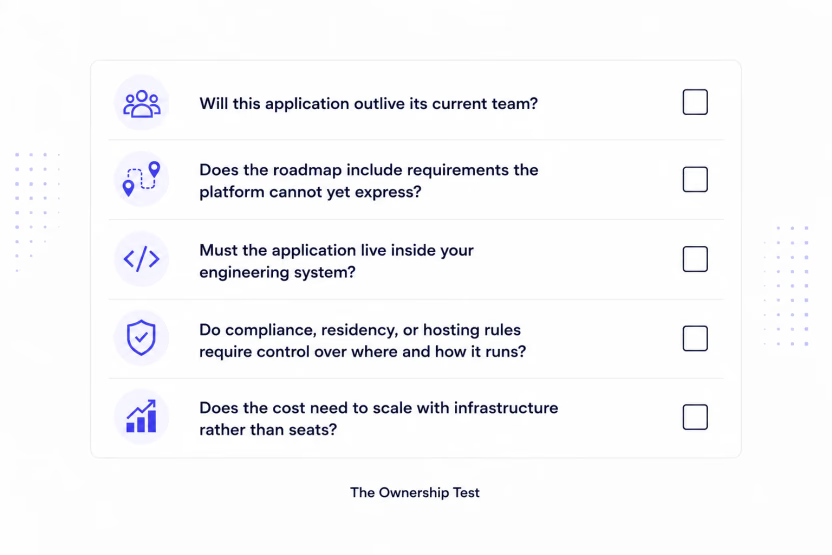
Low-code development works well when the platform’s constraints match the application’s requirements. Owned code becomes the better fit when those constraints conflict with lifespan, engineering workflow, operating requirements, or cost. Understanding when to use low code starts with knowing when an application requires owned code.
These five questions will help you make that call.
1. Will this application outlive its current team?
Long-lived applications need to remain understandable, maintainable, and transferable across teams. If the application is expected to outlive the people who built it, control over its implementation, performance, and portability becomes more important.
2. Does the roadmap include requirements the platform cannot yet express?
A roadmap that depends on specialized workflows, interfaces, business logic, or performance requirements pushes an application beyond the platform’s supported capabilities and extension points, creating scalability challenges.
3. Must the application live inside your engineering system?
Developers need the freedom to work within the engineering workflows, tools, and deployment environments the application requires. If the application needs to follow the same Git, CI, code review, testing, and deployment practices as the rest of the stack, a platform-specific development lifecycle becomes a significant constraint.
4. Do compliance, residency, or hosting rules require control over where and how it runs?
Organizations with specific compliance, residency, or hosting requirements need more control over where and how the application runs.
5. Does the cost need to scale with infrastructure rather than seats?
If the application’s cost needs to follow infrastructure usage rather than users, applications, or platform capacity, the vendor’s pricing model becomes part of the architecture decision.
There is no single best low code platform for every application. The right choice depends on how well its abstractions, engineering workflow, deployment model, and cost structure fit the application. Two or more yeses identify applications where the value of platform abstraction no longer outweighs the need for control.
The Exit Is Cheaper Than the Folklore Says
Migration cost has historically been one of the strongest arguments for staying with a low-code platform. Rebuilding an existing application through traditional development required significant engineering effort, making continued platform dependence easier to justify.
AI-assisted development changes part of that calculation. Code-first tools accelerate scaffolding and first-pass implementation, but developers still need to handle data mapping, domain parity, integrations, edge cases, and validation. The costs of remaining on the platform also continue as long as the application depends on it.
Migration cost should be weighed against the long-term cost of remaining on the platform: what can be reused and what must be rebuilt across data, business rules, UI, integrations, and deployment.
Where Reflex Fits
When the ownership test points toward owned code, code-first development preserves AI-assisted speed while keeping the application in source code the team owns, reviews, tests, and evolves.
Reflex fits this model as an open-source Python framework with an AI builder. Readable Python in the team’s repository keeps the application maintainable beyond the engineer who built it.
As a framework, Reflex is not limited to predefined workflows and UI constraints. Standard Git and CI workflows keep development within the team’s existing engineering system.
On-premises, VPC, and air-gapped deployment support give teams control over where the application runs. The open-source framework has no seat-based pricing, with costs scaling with infrastructure.
Dell provides an illustrative example: one engineer built the full-stack production app in Reflex, and more than 200 engineers now use it.
Low-code still makes sense when the platform meets the application’s requirements and aligns with the team’s operating model. When ownership matters more, code-first development keeps the productivity benefits of AI-assisted development without giving up control of the application.
Written by

FAQs
What are the main low-code development limitations?
The main low-code development limitations are portability, customization ceilings, engineering workflow friction, and cost and governance at scale. These limitations become more significant when an app needs capabilities, workflows, or engineering practices that the platform does not support natively.
Can a low-code app scale to enterprise use?
An enterprise low code platform needs to meet the application’s performance, security, scalability, integration, deployment, and governance requirements. Those requirements become more important as applications grow and become more deeply embedded in the organization.
Is low-code vendor lock-in a real problem?
Yes. Low-code vendor lock-in becomes a concern when applications rely heavily on platform-specific components, workflows, services, or runtime behavior. The more of the application that depends on those abstractions, the more work migration requires.
Can you export source code from a low-code platform?
Source-code export varies by platform. Some low-code platforms generate source code that teams can inspect and maintain, while others rely more heavily on models, metadata, configuration, or platform-specific components. Even when source code can be exported, an export does not preserve the platform runtime, workflows, integrations, or other dependencies needed to run the application independently.
When should you move from low-code to custom code?
Consider moving to custom code when platform workarounds, engineering requirements, portability needs, hosting or compliance requirements, or long-term costs outweigh the benefits of staying on the platform. The Ownership Test provides a practical signal: two or more ‘yes’ answers are a strong signal that owned code is the better fit.
Is low-code secure for regulated or compliance-heavy apps?
Yes, low-code can be secure for regulated and compliance-heavy applications when the platform and deployment model meet the application's security, data residency, hosting, access control, and compliance requirements.
What are the alternatives to low-code platforms?
The main alternatives are no-code platforms, traditional custom development, and code-first frameworks. No-code reduces the amount of code teams write but offers less control, while custom development provides full control over the application and its infrastructure. Code-first frameworks combine source-code ownership with development workflows that support AI-assisted productivity.
Is low-code cheaper than custom development?
Low-code reduces upfront engineering effort, but licensing, usage, infrastructure, customization, maintenance, and governance add to the total cost as an application grows. Custom development requires greater upfront engineering effort while giving teams control over the code, infrastructure, and long-term costs.