An MRP rework request has sat in the backlog for two quarters; a SaaS vendor sent a quote; someone says, "I could build this in a week with AI." All three things are true at once, which is exactly why the old decision process breaks down.
That old process was simple: buy, unless you have six months and a full team to build it yourself. That doesn't really work anymore. Some teams stick with that old default anyway, since it no longer prices building right. Others overcorrect, insisting that building software now costs a fraction of what it did. That's only true for the upfront line, and it ignores everything that happens after launch.
AI changed the economics at the front of the curve by making software development faster and cheaper up front, but the tail didn't move. That asymmetry is the whole story. Everyone noticed building software go from a quarter-long project to something that ships in days, which is why "I could build this in a week" became a sentence people actually say. Almost nobody repriced the tail to match. That's why the 2026 build vs buy decision now turns almost entirely on the tail. It comes down to which workflows you should own, and whether your build leaves you with code you can actually maintain.
Scope It First: This Is About Internal Software
Customer-facing decisions hinge on growth potential and differentiation. Decisions about internal tools hinge on process fit, ownership, and lifetime cost instead. Most build vs buy advice conflates the two, producing the wrong weights when you score your own decision.
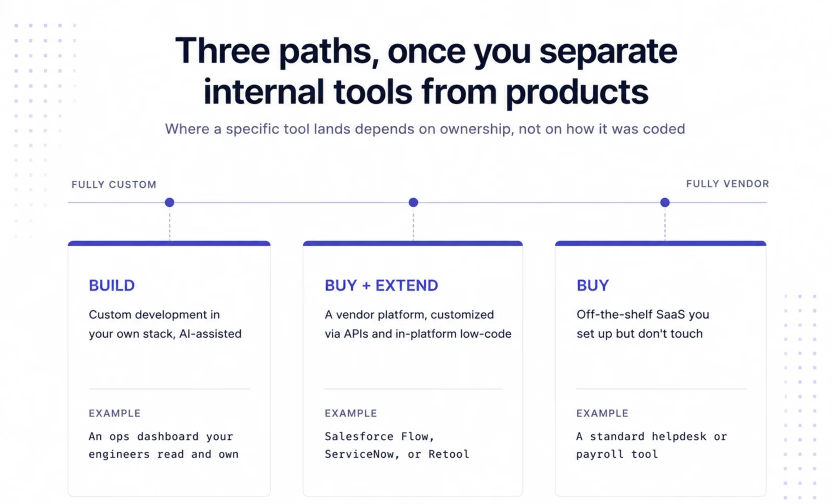
At the center of this choice sits a familiar question: build vs buy software, or custom software vs SaaS, with a third option in between. Three paths exist once you separate internal tools from products, defined below with an example each.
Build means you build internal tools with custom software development in your stack, now AI-assisted. An MRP rework that encodes plant-specific logic no packaged system handles is the clearest example.
Buy means an off-the-shelf software solution: a SaaS product you set up but don't touch. It deploys fast with little effort, which is why it stays the default for commodity work like helpdesk or payroll.
Buy and extend means customizing a purchased enterprise application development platform, such as Salesforce Flow, ServiceNow App Engine, or Retool, via native configuration, plugins, APIs, or low-code. You use the vendor's product as a foundation and build your own rules on top of it.
Where AI-built fits
AI-built software isn't a fourth path of its own. It's a cost modifier on build, not a new category of development. Prompt-to-app tools change the upfront economics, but the output still lands in one of the three paths above, depending on whether you own it.
Four Questions to Guide Your Decision
Four questions form this framework's spine. Each gets a build-leaning answer, a buy-leaning answer, and a named example.
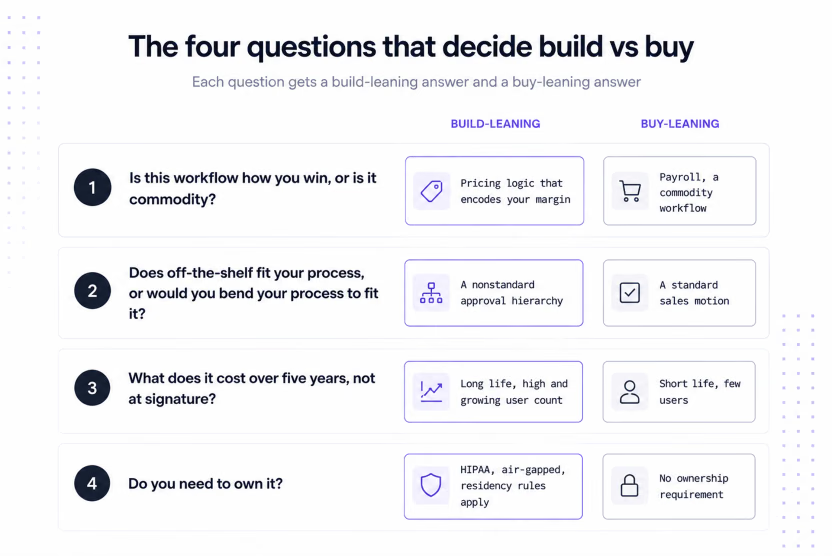
1. Is this workflow how you win, or is it commodity?
Payroll is usually commodity, so buy it, but a pricing-approval workflow built around your margin rules leans toward build instead. The test is simple: would a competitor using the identical tool actually matter?
If the answer is no, then buy. Many internal tools are commodity workflows, so buy is the default for most rows in any backlog.
Two examples turn on differentiation. A CRM is worth building when how you manage relationships is an edge: a sales motion or data model that a packaged CRM would flatten. A trading order management system is sharper: when execution and risk logic are the desk's edge, an off-the-shelf system strips what differentiates it. The same test applies both ways: if it flips to yes, building deserves a look.
2. Does off-the-shelf fit your process, or would you bend your process to fit it?
The hidden cost of buying isn't the subscription; it's the workaround layer around a tool that almost fits. A review flow with a nonstandard hierarchy is a common example, since off-the-shelf tools tend to model approval chains the same generic way. A standard sales motion fits a standard CRM fine, so bending is reasonable when your process isn't special.
ERP and MRP are the clearest process-fit cases. A diverging process means bending the business around the tool, or building the part that doesn't fit instead. MRP is the clearest case, since plant-specific logic often means a custom build fits where a packaged module fought it.
3. What does it cost over five years, not at signature?
Buying compounds: seat growth, tier upgrades, usage pricing, integration, admin overhead. Building front-loads, then flattens into annual maintenance. Neither is cheaper in general; the crossover depends on lifespan and user count, exactly what the scorecard weights.
4. Do you need to own it?
Compliance, residency, or "data can't leave our infrastructure" policies change the question. If any apply, then the choice narrows to build or self-hostable buy, eliminating most SaaS regardless of price.
Electronic health records make the ownership case: patient data carries HIPAA and often residency or air-gapped rules. The question isn't price. It's whether you can meet those obligations on the deployment model a vendor actually offers.
Building on a self-hostable stack satisfies those obligations, and your team stops depending on a vendor's uptime or pricing. Reflex's compliance posture matters here: SOC 2 report, a HIPAA business associate agreement (BAA), and the option to self-host on-prem or air-gapped. All of that sits on the enterprise tier, with audit logs and role-based access built in.
The Scorecard to Help You Decide
A scorecard turns the framework into a weighted score you can use to evaluate the decision. Score each criterion from one to five: the table sets what a one and five look like, while two, three, and four represent real ground between them. A two means the criterion leans toward buying, a three means it is genuinely mixed, and a four means it leans toward building. For example, a score of three on a criterion weighted at 20 percent contributes 0.6 to the total (3 × 0.20 = 0.6). Add up all seven weighted scores for your final result.
| Criterion | 1 looks like | 5 looks like | Weight |
|---|---|---|---|
| Differentiation | Pure commodity, no edge | Core to how you compete | 20% |
| Process fit | Standard workflow, any vendor fits | Nonstandard, no vendor fits well | 15% |
| Five-year cost | Buying wins at your scale | Building wins at your scale | 15% |
| Ownership requirement | No residency, compliance, or air-gap need | Hard requirement to own data or deployment | 15% |
| Maintainability of the likely build | Output would be a black box | Code your team can read and run | 15% |
| Team capacity to own the tail | No spare engineering capacity | Dedicated owner, roadmap capacity exists | 10% |
| Expected lifespan | Short-lived, one-off need | Multi-year, core to operations | 10% |
Add the scores, then read the band:
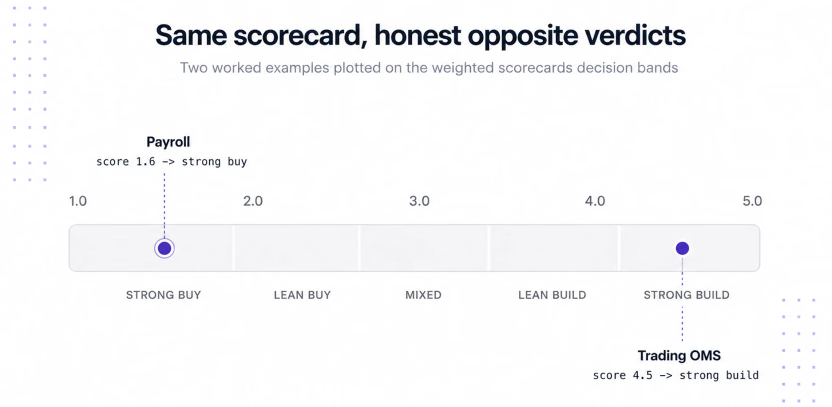
- 1.0 up to 2.0: strong buy
- above 2.0 up to 2.8: lean buy
- above 2.8 up to 3.4: mixed, lean toward buy and extend
- above 3.4 up to 4.2: lean build
- above 4.2 to 5.0: strong build
Two illustrative scorings show honest, opposite verdicts. A trading order management system with firm-specific execution logic lands at 4.5, a strong build; a standard payroll tool lands at 1.6, a strong buy. Run your own tool through the same rows to see where it starts the conversation.
The Honest Total Cost of Ownership Math
Five-year math beats sticker-price math. Here's what each path costs past the first invoice.
What buy actually costs over five years
A buy decision's price tag starts with the subscription, but seat growth changes that number yearly. Tier upgrades add up fast: a needed feature sits behind the next tier, a pattern vendors call feature packaging and users call a feature tax. Implementation, integration, and admin time all continue past the signature, and unused seats add a waste line that few budgets track.
Zylo's 2026 SaaS Management Index found 76.6 percent hit unexpected costs after signing, and 77.5 percent paid extra for AI or consumption features. Enterprise SaaS rollouts still take six to 18 months anyway.
What build actually costs over five years
The price of software development starts with the upfront build. Internal dashboards and integration glue that took a quarter now ship in days, a 2026 shift for this slice of software.
The tail is where AI-optimism pitches stop being honest. Maintenance, security review, and a feature sprint or two a year run several times the original build spend. Research on software lifecycle costs finds maintenance is more than half of a system's lifetime cost.
A worked example
Take one tool from a reader's backlog: an MRP rework, 40 users growing to 100, nonstandard approval logic included. Every figure below is illustrative, not pulled from any source. Replace them with your own before trusting the result.
| Five-year cost (illustrative) | Build | Buy |
|---|---|---|
| Upfront | $80,000 for one AI-assisted engineer, roughly six weeks | $45,000 to implement for 40 users |
| Running cost, years 1-5 | $85,000, about 15% of one engineer's time yearly | $199,000: users 40 to 100, one renewal uplift, one tier upgrade |
| Five-year total | $165,000 | $244,000 |
The growing user count compounds the buy column yearly, while build flattens after year one. Real user growth plus a nonstandard process is what lands this profile on the build side.
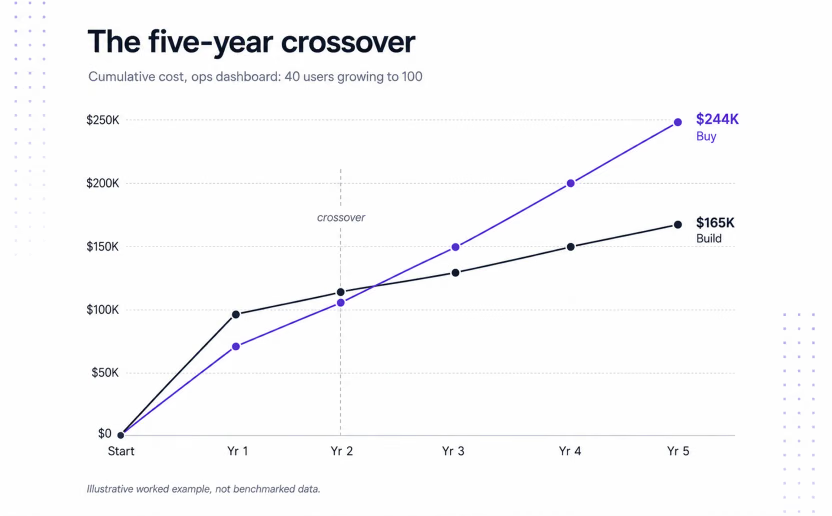
Flip the assumptions: short-lived, few users, standard process. The math then favors buy, since a small build's tail has little scale to spread that cost across.
Why pre-AI TCO comparisons are stale
Any framework priced before AI compares against a price point that's gone, but that correction only touches the upfront line. A framework that discounts maintenance is equally stale in the other direction: it prices half the decision and calls it the whole answer.
Everything above helps you decide whether to build. What follows is about how to build, because the wrong build can fail the same maintenance test as the wrong SaaS.
The Maintenance Tail: Why How You Build Matters More Than Whether You Build
Speed at launch says nothing about upkeep. This section covers the math and the risk that most AI-build pitches skip.
The math nobody puts in the demo
Building software was never the expensive part, keeping it alive is. Here's the tail, stated plainly: a tool that costs X to build likely runs two to four times that to keep alive. Estimates put the multiplier consistently in that two-to-four range, and AI reduced X without touching it.
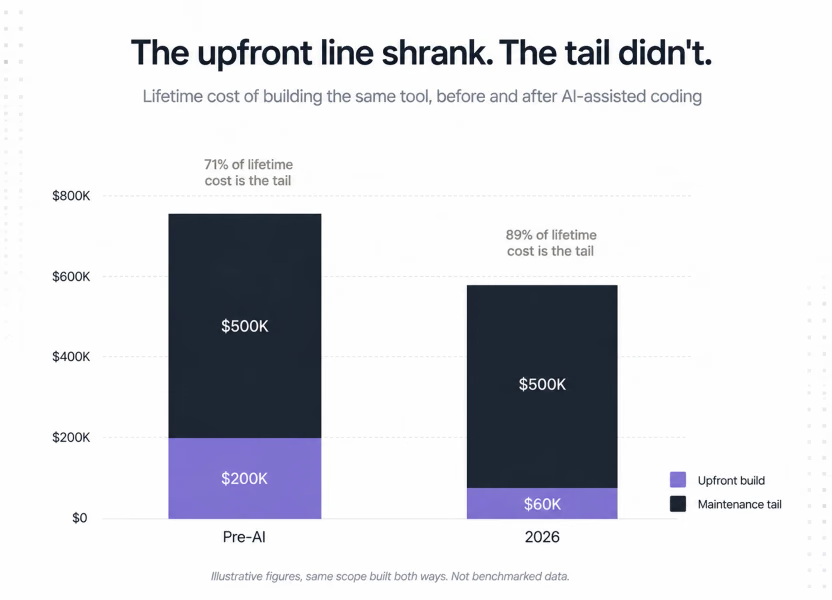
That shift increased maintenance's share of lifetime cost, the opposite of a cheap-to-build pitch. None of this argues against building. It argues for the build path you can afford to keep running.
AI-generated code raises the tail's risk, not just its share
A faster build doesn't just shrink the upfront line; it makes maintaining it riskier too. Security researchers have found that AI models generate working endpoints with no access control unless asked.
Real incidents back this up: RedAccess scanned 380,000 AI-built applications and found roughly 5,000 leaking data in the open. OX Security separately put 62 percent at risk of a critical flaw. None of this means the build was too expensive; it means the security risk doesn't go away by month nine.
The maintainability test
Give any build one gate before development starts: can your team read the code? Does it run in a stack you already use, under your own version control, and get reviewed the way your team normally reviews code? If the answer to any part of that is no, then it's deferred cost, not saved, however fast it shipped.
If You Build: Own the Code
Not every fast build passes the maintainability test, and that's the real dividing line inside "build." AI-assisted paths that output reviewable code in your own stack pass. Hosted builders whose output you can't export or read fail. That's just a build dressed up as something you don't own.
Go back to running examples: CRM, ERP or MRP, EHR, and a trading order management system. Each only makes sense as a build if the result stays maintainable and, in several cases, deployable on your infrastructure.
Reflex is one example of this model: it combines an AI builder with an open-source Python framework, with code that can be kept in the team's repository. You can deploy that code on Reflex's cloud, your own AWS, GCP, or Azure account, or fully on-prem, air-gapped.
A Senior Principal Engineer at Dell proved this pattern, building Dynamic Lab to replace a CLI bottleneck. It's now in beta with 200+ engineers, managing roughly 2,000 VMs, a tail that stayed ownable.
Ready to test this? Reflex's quickstart gets an app running in five minutes. If compliance comes first, then the Reflex enterprise overview covers SOC 2, HIPAA, and self-hosted deployment.
Written by

FAQs
Quick answers to the questions that come up most often. Jump to the one that matches your situation.
What is the build vs buy framework?
It's the four-question scorecard covered in this article: differentiation, process fit, five-year cost, and ownership requirement, each weighted and scored from one to five. The weighted total sorts a decision into strong buy, lean buy, mixed, lean build, or strong build, instead of defaulting to whichever option looks cheaper at signature.
What is the difference between building and buying software?
Building means writing and owning custom internal tools for a workflow. Buying means paying for software that someone else built and maintains. Buy and extend adds your own logic on a purchased platform via its APIs or a low-code layer.
Is it cheaper to build or buy software?
Building software and buying it price out differently depending on three things: differentiation, lifespan, and user count. Commodity workflows are almost always cheaper to buy once you count the maintenance tail. Differentiated, multi-year workflows often flip the math toward build, especially now that AI has cut upfront costs.
When should you build software instead of buying it?
Build when the workflow is how you compete, or when no vendor fits your team. Build too when compliance requires controlling data location. If none apply, then buying is the better bet.
Should you build or buy a CRM?
Buy, unless how you manage relationships is a genuine edge. A standard sales motion fits a standard CRM fine; a sales motion or data model a packaged CRM would flatten is worth building around instead.
How do you calculate the total cost of ownership for build vs buy software?
Price both paths over five years, never at signature. If you're thinking of buying, consider subscription costs, seat growth, implementation, tier upgrades, admin time, and the cost of leaving due to lock-in or migration. If you're thinking of building, then consider the upfront price plus ongoing maintenance, which often runs several times the original cost.
What does a hybrid buy-and-extend approach mean?
Hybrid buy and extend means purchasing a platform covering most of a workflow, then customizing the rest via APIs or low-code. Salesforce Flow and Retool are common examples for teams needing more than a vendor's default but lacking capacity to build.
Is low-code a good alternative to building?
Often, yes. The low code business case is strongest exactly where a full custom build doesn't pencil out: real customization need, but not enough engineering capacity to own a build's maintenance tail. The clearest low code use cases are workflow and approval logic layered onto a platform you don't have to maintain yourself. When to use low code is simple: if a purchased platform already gets most of the way there, extend it instead of building from scratch.
Does AI change the build vs buy software decision?
AI lowered the upfront cost of building internal tools, making build viable for more workflows. It did nothing to lower maintenance costs. The decision comes down to owning what you build, not shipping speed.