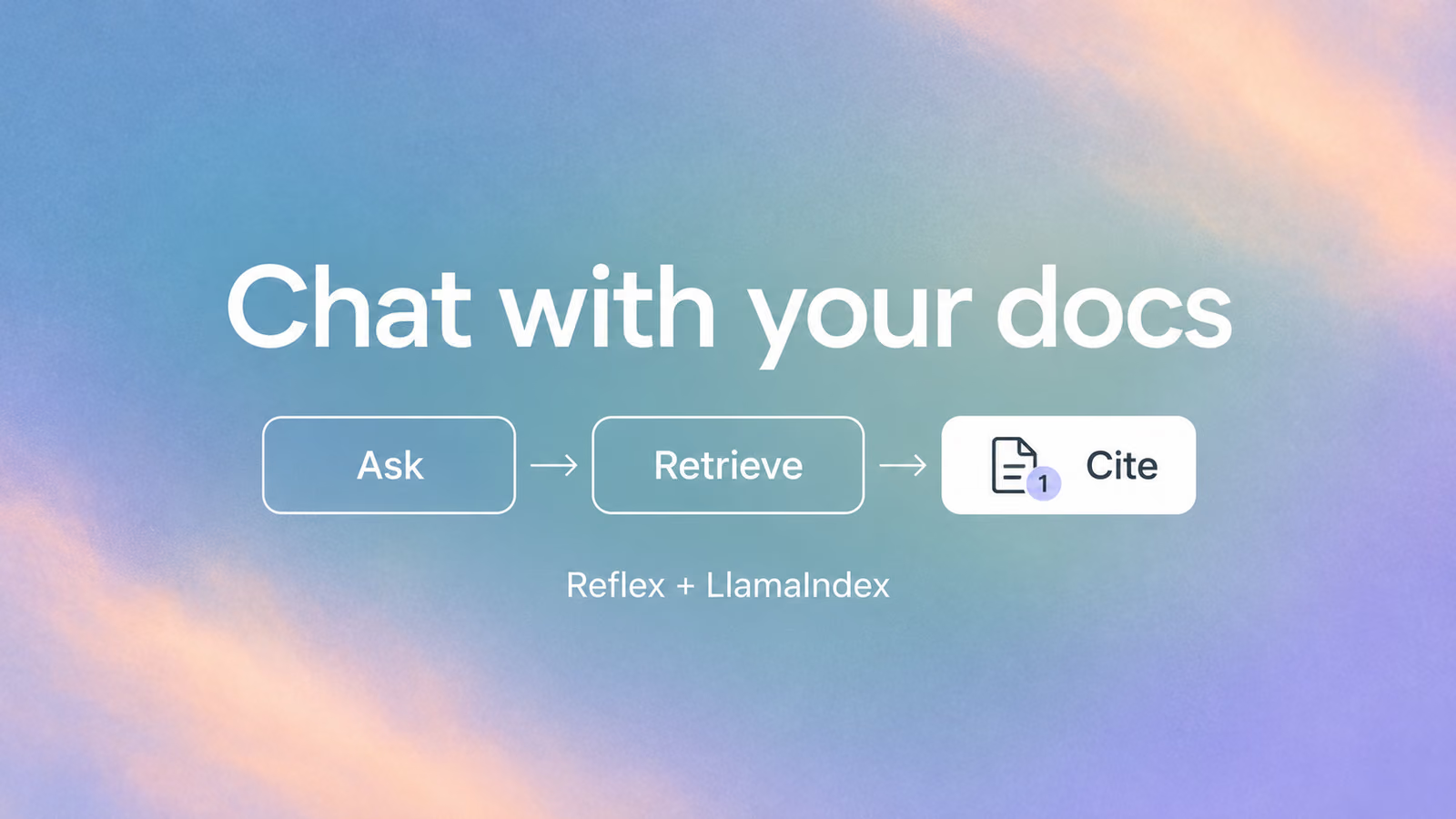
An answer about an unfamiliar API is more useful when you can check the example it came from. In this tutorial, we'll build a Python RAG chatbot for documentation that lets you do both: ask a question in plain English, then open a citation to read the supporting passage.
Reflex handles the interface and each user's conversation in Python. LlamaIndex retrieves relevant documentation and passes it to an OpenAI model to generate an answer. Responses stream into the page as they arrive.
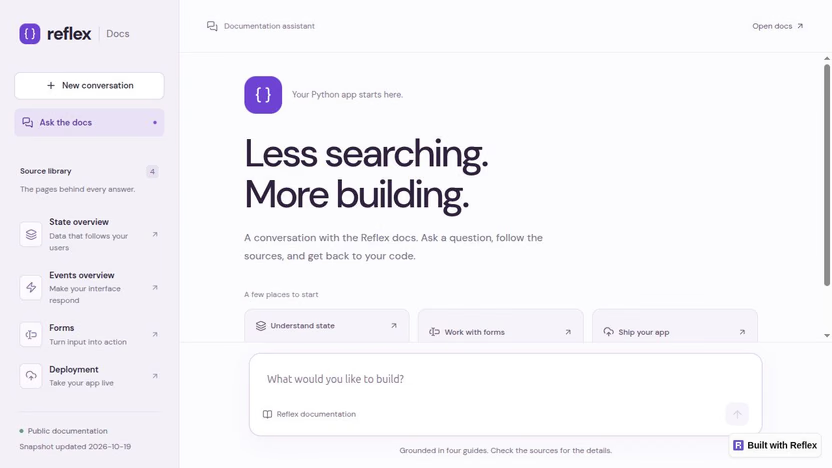
The finished app. The source library makes its coverage visible before you ask a question.
We'll use four Reflex documentation pages: state, events, forms, and deployment. Starting with a small collection makes it easier to inspect what the app retrieved and notice when an answer is wrong. The same structure can support your own documentation later.
View the complete example on GitHub. It includes the app, document snapshots, styles, tests, and dependency lockfile. This walkthrough uses the tested v0.1.1 tag. Run it first, then follow the walkthrough to understand how the pieces fit together. The code excerpts below come from that project; they aren't separate files to paste together.
When to use Reflex and LlamaIndex
Use this approach when you want a custom Python web interface for asking questions about a collection of documents. Reflex handles the chat interface, per-user conversation state, and streaming updates. LlamaIndex handles document indexing and retrieval, and supplies the source passages used for citations. You can change the interface and retrieval logic independently.
This example starts with local Markdown files and uses OpenAI for embeddings and answers. It does not include PDF uploads, automatic website crawling, or access controls for private documents. Citations let readers inspect supporting passages; they do not guarantee that every generated claim is correct.
Run the example
You'll need Python 3.12 or newer, uv, and an OpenAI API key with available API credit. The example was tested with Python 3.14.6, Reflex 0.10.0, and LlamaIndex core 0.14.25. Use the included lockfile to install the tested dependencies.
If you're new to Reflex, the Python chatbot tutorial introduces the interface, state, and streaming basics. This guide adds document retrieval and citations with LlamaIndex.
Clone the tested version and install its dependencies:
This version pins NLTK to an upstream security-fix commit for CVE-2026-81726, pending a patched PyPI release. Keep the lockfile and use uv sync --locked; installing the pinned dependency requires Git.
If you prefer downloading an archive, use the GitHub ZIP for v0.1.1, extract it, and run the installation commands from that folder.
Edit .env and set your key. If that file already exists, edit it rather than replacing it.
The example uses GPT-6 Luna for answers and follow-up question rewriting, with reasoning effort set to none. Embeddings use text-embedding-3-small. Changing only the chat model does not require rebuilding the index.
The key stays on the Python backend. .env is excluded from Git. Indexing sends document text to OpenAI for embedding; questions, retrieved passages, and recent conversation context also go to OpenAI when you chat. Both operations use your API account.
Build the document index, then start the app:
The indexing command should report Indexed 4 documents. Open the frontend URL printed by Reflex, normally http://localhost:3000.
Ask How do I handle form submissions? You should see an answer arrive progressively, with small numbered citations inside the text. Hover over a number for a preview, or click it to open the passage. The exact wording and citation numbers can vary between responses.
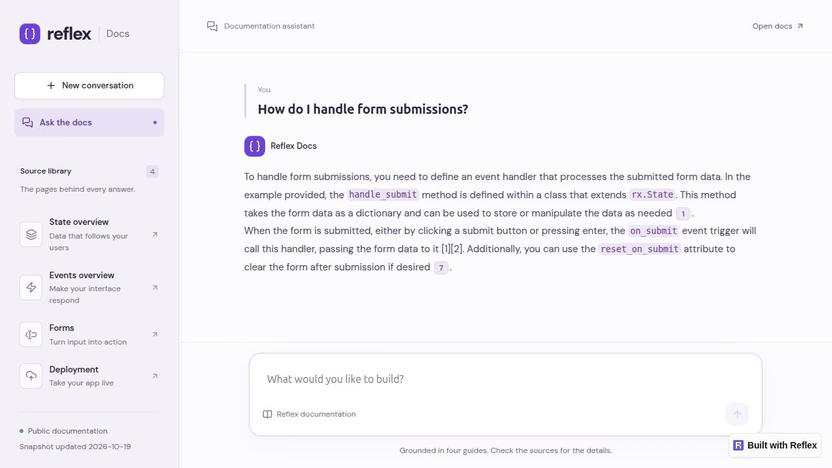
Citation numbers refer to passages retrieved for this answer. Several passages can come from the same documentation page.
Follow a question through the app
The RAG application has two separate paths. Indexing prepares the documents once. Answering searches that saved index each time a user asks a question. This is retrieval augmented generation, or RAG: giving the model relevant source material as part of the request.
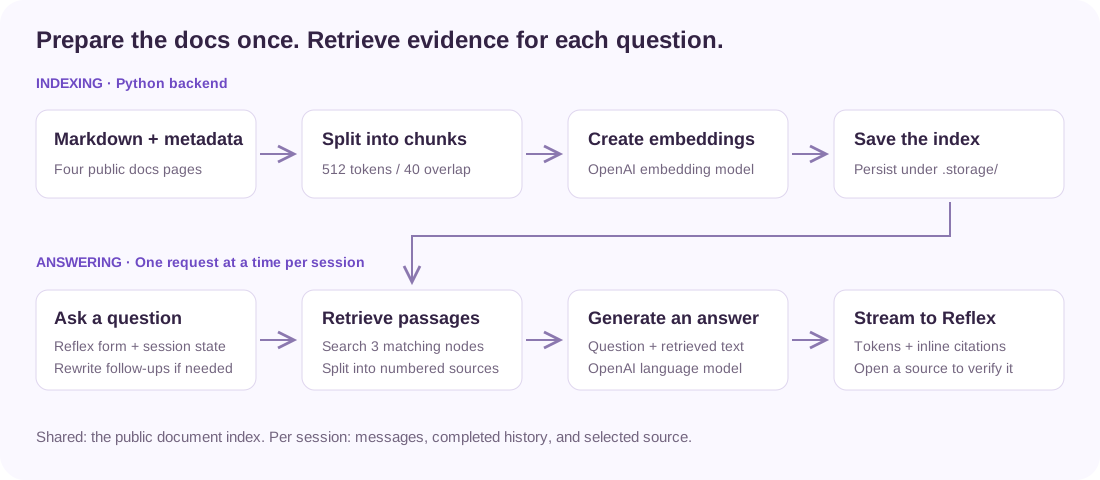
The saved index is shared because the documents are public. Conversation history belongs to the individual browser session.
The example keeps these responsibilities in a few files:
| File | What to look for |
|---|---|
data/*.md and data/sources.json | Document text, page titles, original URLs, and snapshot dates |
docs_chat/rag.py | Index creation, retrieval, follow-up question rewriting, and model calls |
docs_chat/state.py | Conversation history, progress, streaming updates, and selected citations |
docs_chat/citations.py | Conversion of known citation numbers into links |
docs_chat/docs_chat.py | The conversation, composer, hover previews, and source dialog |
assets/design.css | Layout, typography, and responsive styling |
Let's start with the data the model can see.
Give each document a source
The data directory contains Markdown snapshots of four official pages. It is not a live search of the Reflex website. sources.json records the title and canonical URL for each file, along with the date it was fetched.
In build_index() in docs_chat/rag.py, each file becomes a LlamaIndex Document:
That metadata travels with the retrieved text. Later, the interface can display Forms and link to the original page without asking the model to invent a URL.
The URL and fetch date are retained for the app, but excluded from the embedding input and the model's source text. They help identify a passage; they don't explain how to use a form.
Build and reuse the index
The next part of build_index() splits the documents into overlapping chunks, creates embeddings, and saves the index:
An embedding represents text as a vector that can be compared with a question's embedding. Retrieving similar chunks gives the model a smaller set of relevant passages instead of the entire documentation collection.
Here, chunks target 512 tokens with 40 tokens of overlap. The overlap preserves some context near chunk boundaries. These values are starting points for this small collection, not settings that will suit every document.
The index is saved under .storage/. Loading the app doesn't re-embed the files. get_index() loads the saved index and caches it in the Python process; a fingerprint of the content, source metadata, and embedding model identifies when it needs rebuilding.
That distinction matters when you edit a document. Changing a Markdown file does not change its existing embedding. Run the indexing command again after updating the snapshot.
Retrieve passages and request a cited answer
Inside answer() in docs_chat/rag.py, the app loads the index and creates a LlamaIndex citation query engine:
The engine retrieves up to three matching index nodes, then splits their text into smaller citation passages. That's why an answer can have a citation numbered 8 even though similarity_top_k is 3: retrieval nodes and citation passages are different units.
The response contains both an asynchronous stream of answer text and source_nodes, the passages used by the citation engine. Keep those together. A number alone would be a decorative label; the source text makes it useful.
The model can still misunderstand a passage or attach the wrong citation. The interface gives readers a way to inspect the evidence, rather than treating a citation as proof of correctness.
Stream the answer through Reflex state
The conversation lives in a Reflex State class. Each turn stores the question, the raw answer, the display Markdown, the retrieved sources, and whether generation completed.
The form triggers State.ask, an async event decorated with @rx.event(background=True). Inside an initial async with self block, it validates the input, snapshots the completed conversation history, adds an empty turn, and sets busy. Leaving that block sends the progress update and releases the session lock before retrieval starts.
The handler awaits rag.answer() outside the state lock, then briefly enters async with self to attach the numbered sources. It also waits for each streamed token outside the lock and reacquires it only to update the answer:
For a background event, leaving async with self sends the state changes to the browser and releases the lock. Citation controls and other session events can run while the next token is pending. The answer grows without a frontend polling loop.
There are two versions of the answer for a reason. answer preserves the model's original text for future conversation context. answer_markdown adds the app's citation links for display. Presentation details don't need to become part of the next model prompt.
The handler also catches failures and clears busy in a finally block. If a connection drops halfway through an answer, the text received so far stays visible, but the turn remains incomplete and is excluded from future context.
The busy check and update happen under the same lock, so duplicate submissions cannot start a second answer. The index-building event uses the same background pattern: it runs indexing in a worker thread outside the session lock, with a separate process-level lock preventing concurrent index builds. Background events do not provide cancellation controls or durable jobs that survive a server restart.
Make follow-up questions understandable
Try asking How is state kept separate for each user?, followed by Where is that state stored?
The second question is ambiguous by itself. Before retrieval, the app uses up to five completed turns to rewrite a follow-up into a standalone question. It then searches the index with that rewritten question.
The previous turns come from that user's Reflex state. The shared index contains public documentation, but there is no process-global conversation history. This keeps one session's questions out of another session's retrieval prompt.
Rewriting adds a model call for follow-ups. If your app only needs independent questions, you can remove the if history: block in rag.answer() and keep the rest of the retrieval pipeline.
Put the evidence beside the answer
A source section beneath every response can quickly become longer than the conversation. This app keeps the references inline and shows the passage when the reader asks for it.
link_citations() converts a known citation such as [1] into a Markdown link containing both the turn number and the source number. It leaves code examples and existing Markdown links alone, and doesn't create a source link for a number absent from the response's source list.
Including the turn number prevents two answers that both cite [1] from opening each other's passages. State.citation_lookup maps those references to their title, URL, preview, and full excerpt.
The answer renderer then uses a custom component for Markdown links:
inline_citation() looks up the reference. Known sources become small buttons wrapped in rx.hover_card; ordinary links stay links. Hovering gives a quick preview. Clicking, tapping, or activating the button with the keyboard opens a controlled rx.dialog containing the full passage.
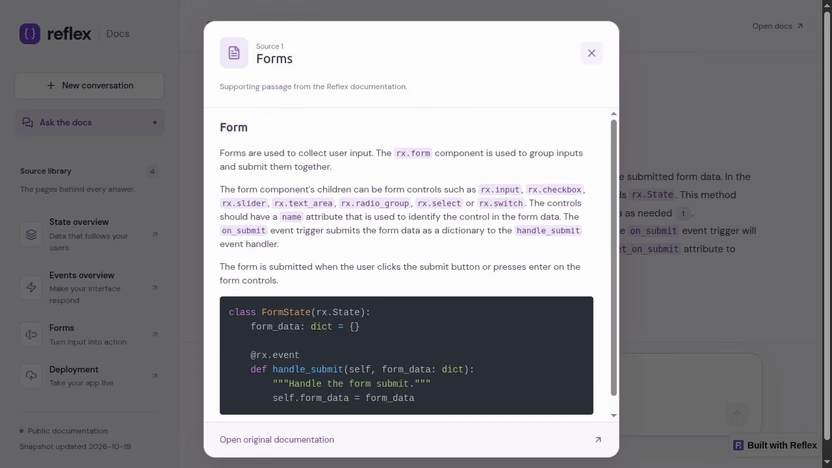
The source dialog preserves the documentation's code example and gives the reader a direct route to the original page.
The click handler is deliberately small:
The preview is a convenience; the button and dialog also work without hover. The dialog's original-document link comes from the stored metadata, not generated text.
One layout detail is easy to miss: keep the citation trigger's wrapper inline. A block-level wrapper can push a citation onto its own line and break the sentence around it. The example uses an inline span around the button and inline-flex for the chip itself.
The composer follows a similar principle: give it its own space. The conversation scrolls inside a flex layout, while the composer stays in a separate bottom section. Long answers don't push the input offscreen, and the input doesn't cover the final lines of a response.
Check the behavior before expanding the collection
Use a few questions whose answers you can verify directly:
- Ask How do I handle form submissions? Open a citation and check that the passage supports the explanation of named inputs and
on_submit. - Ask a state question, then a short follow-up. Check that the answer keeps the state topic.
- Ask about a topic outside the four pages, such as a particular enterprise authentication provider. Check whether the answer acknowledges the missing information instead of inventing instructions.
- Open the app in a separate browser session. Its conversation should start empty.
- Use New conversation and check that the previous context and selected citation are cleared.
The included automated checks cover retrieval with test models, persistence, streamed state updates, citation links, failure recovery, and session isolation:
Those tests don't grade the real model's answers. Keep a small set of representative questions and expected supporting passages as you change the corpus, model, or chunk sizes. When an answer is poor, inspect the retrieved text first: did the app find the right material, or did it generate a poor answer from good material?
If setup fails, the app explains the next step. Check setup checks the local key configuration and index fingerprint. Build / retry index actually runs indexing. An API credit error needs to be resolved in the provider account before retrying; pressing the setup check won't rebuild the index or verify your balance.
Use your own documentation
For another collection of Markdown files, place the files in data/ and add a matching entry for each filename to data/sources.json. Each entry needs a human-readable title, a source_url, and a fetched_at date. The catalog determines which files are indexed.
Then rebuild:
To refresh the bundled Reflex pages, use the fetch script first:
Stop the running app while replacing the index, then restart it. This also updates the snapshot date shown in the source library. To add another official Reflex page, extend PAGES in fetch_docs.py before fetching. For a different documentation collection, adapt that script or supply the Markdown yourself; the current fetcher specifically expects Reflex's Markdown exports.
For a public deployment, add access and usage controls before exposing an app backed by your paid API key. Keep the key in backend environment variables and make the persisted index available to the deployed backend. The local index-building control is intended for this development example, not an unrestricted public endpoint. The Reflex deployment guide covers deploying the application; authentication, rate limits, and persistent storage depend on how you host it.
If you move to private documents, retrieval also needs to respect each user's document permissions. Separate chat histories alone don't provide that access control.
Start by replacing one document and asking questions you know it answers. Follow a citation all the way back to its source. Once that path works, expand the collection and test again.