
TLDR:
- Sankey plots (also called sankey graphs or sankey charts) show flow quantities through arrow width, making resource distribution patterns instantly visible across stages.
- Python's Plotly library builds interactive diagrams where users hover to see exact values and trace specific paths.
- Excel lacks native Sankey support; R's networkD3 and online generators offer alternatives for non-Python workflows.
- Limit nodes to 8-12 per column in any sankey graph and collapse flows under 3% into "Other" to maintain readability at scale.
- Reflex wraps Plotly sankey graph capabilities into full-stack Python apps with authentication and real-time updates, eliminating frontend handoffs.
What is a Sankey Plot (Sankey Graph)?
A Sankey plot, also known as a sankey graph, sankey chart, or san key diagram, is a flow diagram where arrow width scales proportionally to the quantity being shown. More flow means a wider arrow, less flow means a narrower one. That single rule makes Sankey plots unusually intuitive: you can read the relative importance of each path at a glance without parsing numbers.
The name traces back to Irish Captain Matthew Henry Phineas Riall Sankey, who used the format in 1898 to show the energy performance of a steam engine. Over a century later, the concept remains unchanged. What has changed is where these sankey charts show up: energy audits, budget flows, website traffic funnels, supply chain logistics, and genomics research all rely on them.
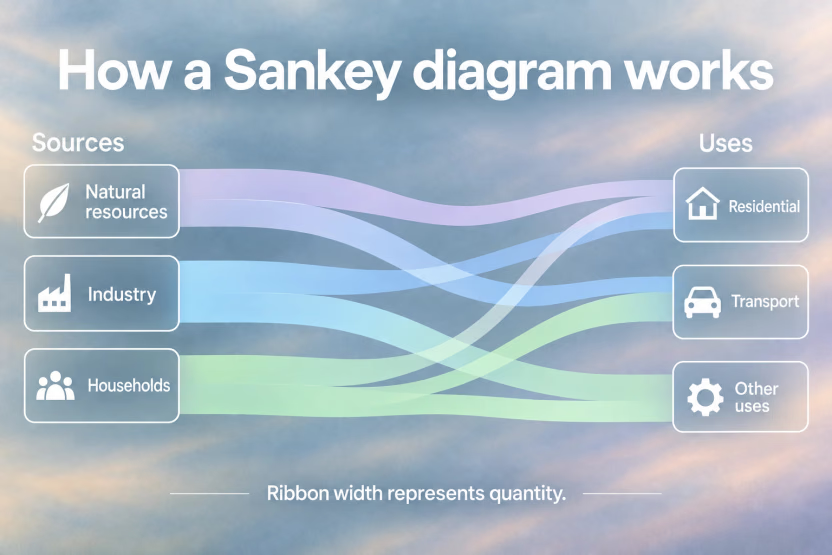
Three core concepts define any Sankey plot:
- Nodes are the stages or categories, the boxes or columns where flow originates, passes through, or terminates.
- Links are the arrows or bands connecting those nodes, and their width encodes the actual quantity.
- The direction of flow moves left to right by convention, though some tools support top-down layouts.
The width of the arrows is proportional to the flow rate of the measured property, and that constraint is what separates a sankey graph from a generic flowchart.
Where a bar chart answers "how much," a sankey chart answers "how much moved from where to where." That distinction matters for any dataset involving transfer, conversion, or distribution across categories. The underlying logic is always the same: map your sources, destinations, and quantities onto nodes and links, and let the widths do the communicating. Every sankey diagram example follows this same principle.
Sankey Plot in Python: How to Make a Sankey Diagram
Python offers several routes to make sankey diagrams, but Python plotting libraries are not all equal. The right choice depends on whether you need interactivity, static output, or a quick proof of concept.
Creating a Plotly Sankey Diagram in Python
Plotly is the go-to library for interactive sankey graphs in Python. Its go.Sankey object expects two core inputs: a node dictionary defining your categories, and a link dictionary specifying source, target, and value arrays. Sources and targets are numeric indices referring back to the node list, so the mapping step matters. Once built, Plotly's output lets users hover over flows to see exact values and trace specific paths through the diagram, which is why it dominates production dashboards. The Python Graph Gallery documents this pattern well for anyone building from scratch. For detailed guidance on Sankey diagram best practices and examples, Plotly's guide covers diverse use cases and design decisions.
Here is a quick sankey diagram Python example using Plotly to visualize a simple resource flow:
ExpandCollapse
This sankey example produces an interactive sankey chart where hovering reveals exact budget amounts at each stage. You can extend this pattern to any dataset by building your node and link arrays from a pandas DataFrame.
Matplotlib Sankey Implementation
Matplotlib includes a built-in Sankey class, though it works quite differently from Plotly. It builds diagrams by connecting individual patches around a single focal unit, making it better suited for simple energy balance diagrams than multi-level flow analysis. Complex node structures get unwieldy fast. Use Matplotlib when you need a static image embedded in an existing figure, and reach for Plotly when interaction or multi-node complexity is involved.
Working with Pandas DataFrames
Raw data rarely arrives pre-indexed. Typically you start with a DataFrame with source, target, and flow values. The key transformation is building a unique node list, then replacing string names with their corresponding integer positions before passing the arrays to Plotly. A simple pd.factorize or manual enumeration handles this cleanly for most datasets.
Sankey Plot Tools and Sankey Diagram Generators
Not every sankey graph needs Python. Depending on your environment and audience, R, Excel, or a sankey diagram generator may be faster to make sankey diagrams.
R Sankey Diagrams with networkD3 and ggplot2
The networkD3 package in R is the cleanest route to interactive, D3-powered Sankey diagrams. It expects a node dataframe and a link dataframe with zero-indexed source and target columns, which takes some adjustment if your data uses string identifiers. The payoff is smooth browser-based output. As the R Graph Gallery notes, networkD3 "allows to visualize networks using several kinds of viz" with Sankey being among its most compelling outputs.
For ggplot2 users, ggsankey and ggalluvial offer a grammar-of-graphics approach better suited to alluvial-style plots and categorical flow analysis. These stay within the tidyverse ecosystem, so if your pipeline is already dplyr-based, the data prep stays consistent.
Excel Sankey Approaches
Excel has no native Sankey chart type. As ChartExpo documents, "although Excel does not include a built-in option for creating this type of flow visualization, you can still build one using specialized tools or add-ins." Add-ins like ChartExpo and SankeyArt handle the drawing layer but add cost and require installation. Manual stacked-area workarounds exist but break under complex node structures.
Sankey Diagram Generator Tools and BI Platforms
Web-based sankey diagram generators like SankeyMATIC let you paste data and download an image in minutes, no code required. They work well for presentations and one-off diagrams but offer limited customization and no programmatic updating. Tableau builds Sankey charts through calculated fields and dual-axis chart layering, which integrates naturally into existing BI dashboards but requires familiarity with Tableau's data model.
| Tool/Library | Language/Platform | Interactivity | Best Use Case | Learning Curve | Key Limitations |
|---|---|---|---|---|---|
| Plotly go.Sankey | Python | Full interactive support with hover states, tooltips, and zoom capabilities | Production dashboards requiring user interaction and complex multi-node flows | Moderate - requires understanding of node indexing and link structure | Requires data pre-processing to convert string identifiers to numeric indices |
| Matplotlib Sankey | Python | Static output only | Simple energy balance diagrams and single-focal-unit flows for print publications | Low for basic diagrams | Becomes unwieldy with complex node structures; limited to simple flows |
| networkD3 | R | D3-powered browser-based interaction | R users needing interactive output within existing tidyverse workflows | Moderate - requires zero-indexed dataframes and node/link structure | Requires adjustment from string identifiers to numeric indices |
| ggplot2 (ggsankey/ggalluvial) | R | Static or limited interaction | Alluvial-style categorical flow analysis within grammar-of-graphics framework | Low for ggplot2 users | Better suited for alluvial plots than true quantity-weighted Sankey diagrams |
| Excel Add-ins (ChartExpo, SankeyArt) | Excel | Limited interaction depending on add-in | Business users working entirely within Excel environment | Low - GUI-driven workflow | Requires paid add-ins; no native Excel support; limited customization options |
| Online Generators (SankeyMATIC) | Web browser | Basic interaction in browser preview | One-off diagrams and presentations with no coding required | Very low - paste data and export | No programmatic updating; limited customization; manual data entry required |
Sankey Diagram Examples and Sankey Chart Examples
Sankey diagram examples span nearly every industry. Here are common sankey chart examples that show the format's versatility:
- Energy flow sankey example: National energy audits map fuel sources through conversion stages to end-use sectors, showing exactly where energy is consumed or lost.
- Website traffic sankey graph: Marketing teams trace visitor journeys from acquisition channels through landing pages to conversion events, revealing drop-off points at each stage.
- Budget allocation sankey chart: Finance teams visualize how departmental budgets split across projects, vendors, and cost centers in a single view.
- Supply chain sankey diagram example: Logistics operations track raw materials from suppliers through manufacturing stages to distribution channels and final customers.
Each of these sankey examples follows the same core structure: define your nodes, specify your links with quantities, and let the proportional widths communicate the story. The code snippet above shows exactly this pattern.
Best Practices for Sankey Plot Design
A well-made Sankey requires careful design decisions that depend on the nature of your data and what you want the viewer to take away. The main decisions involve clear axis identification, the number of nodes per step, handling missing data, and the use of color and transparency.
Color and Visual Hierarchy
Assign distinct colors to source nodes and carry those same colors through their outgoing links. Set link opacity between 0.4 and 0.6 to reduce visual overlap without hiding flow paths. For colorblind accessibility, rely on hue plus brightness contrast, not hue alone.
Managing Complexity and Readability
Cap visible nodes around 8 to 12 per column. Beyond that, labels collide and flows become indistinguishable. Collapse low-volume categories into an "Other" bucket when any single path carries less than 2 to 3 percent of total flow.
When Sankey Plots Fail
As Storytelling with Data notes, "precise comparisons need to be made" and comparing flow widths is genuinely difficult, especially across multiple stages. Avoid sankey graphs when your goal is exact value comparison. Reach for bar charts for ranked comparisons, bump charts for rank changes over time, and alluvial diagrams for tracking individual-level transitions across categorical states.
Why Sankey Graphs Matter in Data Visualization Applications
Sankey plots and sankey charts earn their place in production applications for reasons that go beyond aesthetics.
Flow patterns that are invisible in tables become immediately obvious when arrow widths scale to actual volume. Spotting where resources concentrate or leak takes seconds instead of minutes of spreadsheet analysis.
Interactivity amplifies that visibility considerably. Hover states, draggable nodes, and live filtering turn a static export into an exploratory tool where stakeholders find answers themselves.
- Sequential process communication is where sankey graphs genuinely outperform alternatives. Customer journeys, manufacturing steps, and budget allocation all involve quantities that split and merge across stages, a structure no bar chart handles cleanly.
- Scale matters too. Enterprise dashboards processing thousands of daily transactions need visualizations that stay readable at summary level while supporting drill-down. The conservation constraint built into Sankey logic, what enters must exit, makes inefficiencies self-evident at any data volume.
- Deployment friction drops when your visualization lives inside a full-stack Python framework. Wrapping Plotly's Sankey capabilities into applications with authentication, database connections, and real-time state updates means data teams can ship interactive dashboards without handing off to a separate frontend team.
Final Thoughts on Making Sankey Diagrams Across Tools
Building a sankey graph in Python with Plotly remains the fastest path to interactive flow visualization, but R, Excel, and sankey diagram generators all have their place depending on your workflow. The real work happens in data prep: mapping string identifiers to numeric indices, collapsing low-volume categories, and choosing colors that clarify instead of confuse. When you're ready to turn a static sankey chart into a full interactive application with authentication, database connections, and real-time updates, Reflex lets you wrap your Plotly visualizations into production-grade Python web apps without writing any JavaScript. Once your node and link structure is clean, the diagram communicates flow patterns instantly, no matter which tool displays it.
Written by

FAQ
Sankey plot Plotly vs matplotlib in Python?
Plotly is the better choice for interactive sankey graphs in Python with hover states and dashboards, while matplotlib's built-in Sankey class works for simple static energy balance diagrams only. If your sankey chart has more than three or four nodes or needs user interaction, a plotly sankey diagram is the only practical option. When you're ready to ship that plotly sankey diagram as a full-stack app with authentication and real-time updates, Reflex wraps Plotly directly so you stay in pure Python.
Can I create a Sankey diagram in Excel without add-ins?
No, not reliably. Excel has no native sankey chart type, and manual workarounds using stacked area charts break down under complex node structures. Your options are paid add-ins like ChartExpo, a sankey diagram generator like SankeyMATIC, or switching to sankey diagram python with Plotly or R with networkD3 for production-quality output.
How do I convert a pandas DataFrame to a Sankey plot?
Extract unique node names from your source and target columns, assign each a numeric index, then map those indices back to your DataFrame rows. Pass the resulting source, target, and value arrays to Plotly's go.Sankey with your node list to make a sankey diagram. This sankey python pattern handles most real-world data transformations cleanly. To turn that DataFrame-driven sankey plot into a production app with database connections and live filtering, Reflex deploys your Plotly code as a full-stack Python web app without any JavaScript.
What's the difference between an alluvial plot and a Sankey diagram?
Alluvial plots track categorical changes across discrete time steps or stages with equal-width flows, while a sankey graph encodes quantity through arrow width and shows actual flow volume. Use alluvials for tracking individual-level state transitions and sankey charts for visualizing resource distribution or transfer across stages.
When should I avoid using a Sankey plot?
Skip sankey graphs when precise numerical comparisons matter or when you need to rank exact values, as bar charts handle that task far better. Also avoid a sankey chart for datasets with more than 10 to 12 nodes per column, where label collision and overlapping flows make the sankey diagram unreadable regardless of tool choice.