Data scientists excel at analysis but struggle with productionization. You build sophisticated models in Jupyter notebooks, then face the dreaded request: "Can we make this a live dashboard?"
The usual options aren't great. Hand it off to engineers and wait months. Use limited dashboard tools that can't handle your analysis complexity. Or learn React, APIs, and deployment just to make your Python work interactive.
This guide shows a different path: transforming your Jupyter analysis directly into a production dashboard without leaving Python.
Let's work with a realistic scenario: analyzing customer churn using the IBM Telco dataset. Here's what a typical analysis notebook looks like:
import pandas as pd
import numpy as np
import matplotlib.pyplot as plt
import seaborn as sns
from sklearn.ensemble import RandomForestClassifier
# Load the IBM Telco customer churn dataset
url = "https://raw.githubusercontent.com/IBM/telco-customer-churn-on-icp4d/master/data/Telco-Customer-Churn.csv"
df = pd.read_csv(url)
print(f"Dataset shape: {df.shape}")
# Prepare columns and add some realistic features
df['last_login'] = pd.to_datetime("2022-01-01") + pd.to_timedelta(np.random.randint(0, 400, len(df)), unit='D')
df['usage_last_30d'] = np.random.randint(10, 500, len(df))
df['usage_prev_30d'] = np.random.randint(10, 500, len(df))
df['support_tickets'] = np.random.poisson(2, len(df))
df['plan_value'] = df['MonthlyCharges']
df['plan_type'] = df['Contract']
df['churned'] = df['Churn'].map({'Yes': 1, 'No': 0})
print(f"Churn rate: {df['churned'].mean():.2%}")
# Feature engineering
df['days_since_last_login'] = (pd.Timestamp.now() - df['last_login']).dt.days
df['usage_decline'] = df['usage_last_30d'] / (df['usage_prev_30d'] + 1e-5)
# Key insights
churn_by_plan = df.groupby('plan_type')['churned'].agg(['count', 'mean'])
print("\nChurn by Plan Type:")
print(churn_by_plan)
# Visualizations
fig, axes = plt.subplots(2, 2, figsize=(12, 8))
churn_by_plan['mean'].plot(kind='bar', ax=axes[0,0], title='Churn Rate by Plan')
df.boxplot('usage_decline', by='churned', ax=axes[0,1])
axes[0,1].set_title('Usage Decline: Churned vs Active')
df.hist(column='days_since_last_login', by='churned', bins=20, ax=axes[1,0])
axes[1,0].set_title('Days Since Last Login Distribution')
sns.histplot(data=df, x='plan_value', hue='churned', kde=True, ax=axes[1,1])
axes[1,1].set_title('Plan Value Distribution')
plt.tight_layout()
plt.show()
# Predictive model
features = ['days_since_last_login', 'usage_decline', 'support_tickets', 'plan_value']
X = df[features]
y = df['churned']
rf = RandomForestClassifier(random_state=42)
rf.fit(X, y)
print(f"\nModel accuracy: {rf.score(X, y):.3f}")
print("Feature importance:")
for feature, importance inzip(features, rf.feature_importances_):
print(f" {feature}: {importance:.3f}")
ExpandCollapse
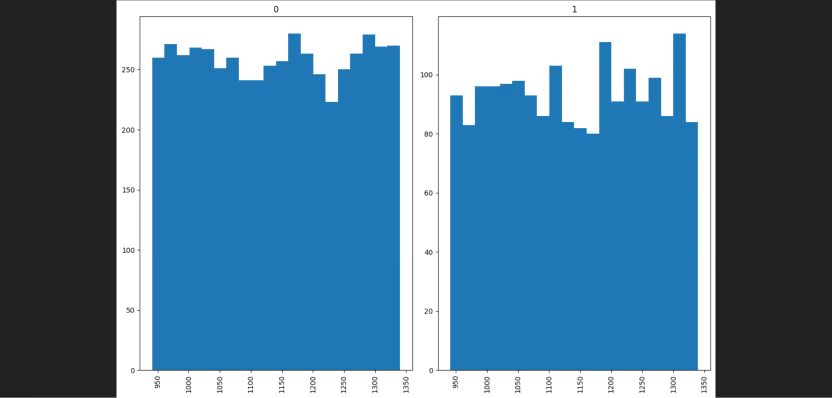
Plots generated from Google Colab using Jupyter Notebook
This notebook does what data scientists do every day: loads data, engineers features, explores patterns, and builds predictive models. The analysis works, the insights are valuable, but it's stuck in a static format.
When stakeholders ask "Can we see this updating with fresh data?" you're back to the productionization problem.
Your notebook analysis is solid, but it has limitations. The plots are static images. The insights are buried in print statements. To see updated results, someone needs to rerun the entire notebook manually.
Traditional solutions force you to choose between complexity and capability:
Flask + React: Build a backend API, create React components, manage state, handle authentication. Weeks of work to recreate what you already built.
Streamlit: Quick to deploy, but limited interactivity. Complex analyses don't translate well to Streamlit's widget-based approach.
Hand-off to engineering: Wait months while engineers rebuild your analysis, often losing nuance in translation.
None of these options preserve your existing work or let you iterate quickly. What if you could keep your Python analysis logic and just make it interactive?
Your notebook's pandas analysis logic stays intact, it just moves into the load_data method. The static matplotlib plots become interactive charts, and your print statements become clean KPI cards. The same insights, now accessible to anyone with a web browser.
If you want to try this dashboard live, you can do so here on Reflex Build -> Churn Dashboard
You can edit, re-work, and improve it as you see fit!
The final step is sharing your work. A dashboard is only valuable if others can access it, and deployment is where most data science projects stall.
With Reflex, deployment is built-in. You don’t need to worry about servers, Docker, or frontend builds. Your Python app can be published live with a single command:
reflex deploy
For detailed information on how deployment works, visit the Cloud Deploy Docs to find out how to begin.
We started with a Jupyter notebook full of exploratory analysis—static plots and printouts that lived on your laptop. Then, we showed how to transform that work into a production-grade dashboard with Reflex, keeping your Python workflow intact. Finally, we saw how easy it is to deploy and share your dashboard.
With this workflow, data scientists can go from notebook → live dashboard → deployed app in hours instead of weeks.
Next steps:
Try deploying your own analysis.
Explore more Reflex components for interactive UIs.
Experiment with refreshing your data sources.
The barrier between analysis and production is shrinking. With Reflex, your notebook insights can live on the web.